This guide provides a step-by-step guide to integrating the Microsoft Graph API with a Spring Boot Java application. It covers multi-tenant SSO authentication along with core Microsoft services such as User Data, SharePoint, OneDrive, and Outlook. Start with Phase 0 for Azure App Registration, then follow the complete Spring Boot implementation detailed in Section 8 to build an end-to-end solution.
Introduction & Architecture
Microsoft Graph API is the unified API for Microsoft 365 (Office 365, Azure AD, SharePoint, OneDrive, Outlook, Teams). This guide shows how to integrate a Spring Boot Java application for:
- Multi-tenant SSO – Users from different Azure AD tenants sign in once.
- User data – Read profile and directory users via Graph.
- SharePoint & OneDrive – List, upload, download files.
- Outlook – Send emails on behalf of users or the app.
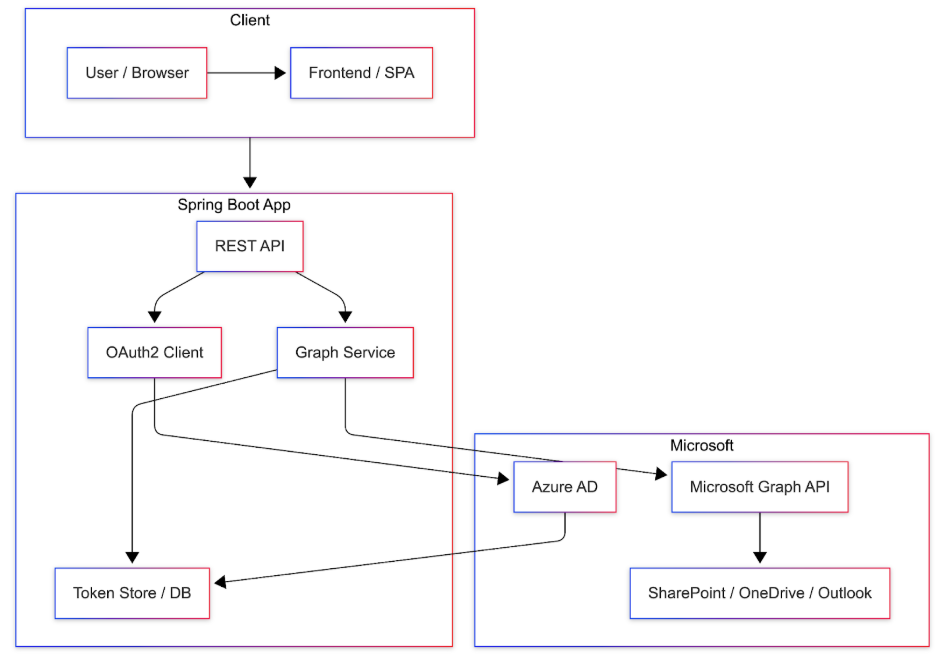
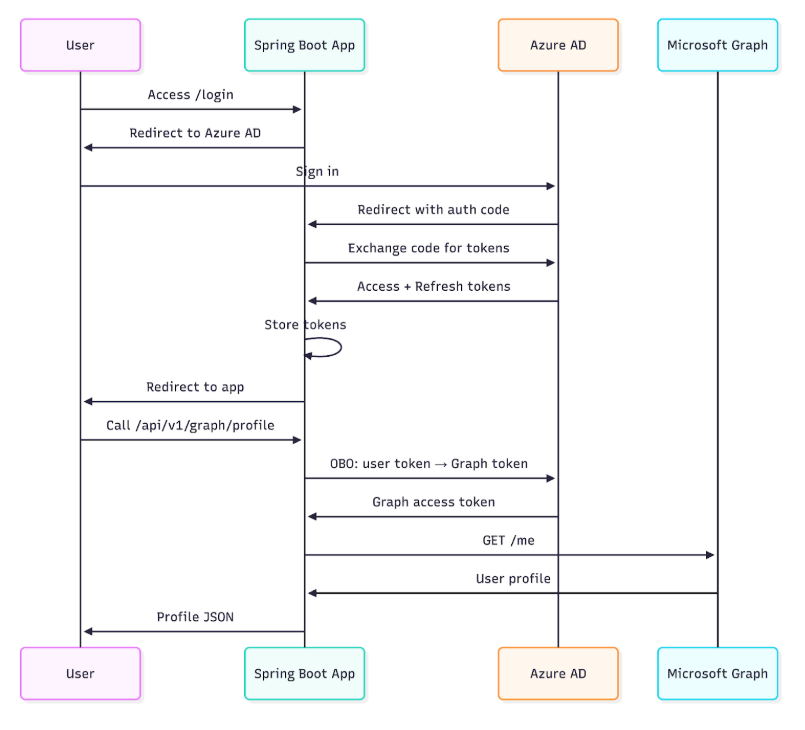
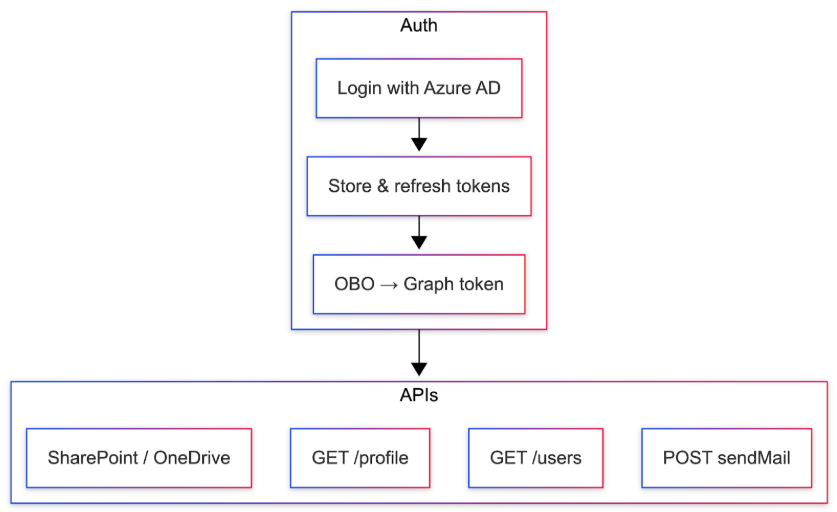
Users sign in via Azure AD; the app stores and refreshes tokens and calls Graph with On-Behalf-Of (OBO) or Application permissions.
Prerequisites

Use Spring Initializr and select Web, Security, OAuth2 Client, WebFlux, PostgreSQL (if storing tokens in DB).
Phase 0: Create the App in Microsoft (Azure) – Do This First
Before writing any Spring Boot code, create and configure your application in Microsoft Azure. This single app registration will support SSO, User Data, SharePoint, OneDrive, and Outlook.
Step 1 – Open the Azure Portal and start registration
- Go to portal.azure.com and sign in.
- Search for Azure Active Directory (or Microsoft Entra ID) and open it.
- Left menu → App registrations → + New registration.

Step 2 – Name and account type
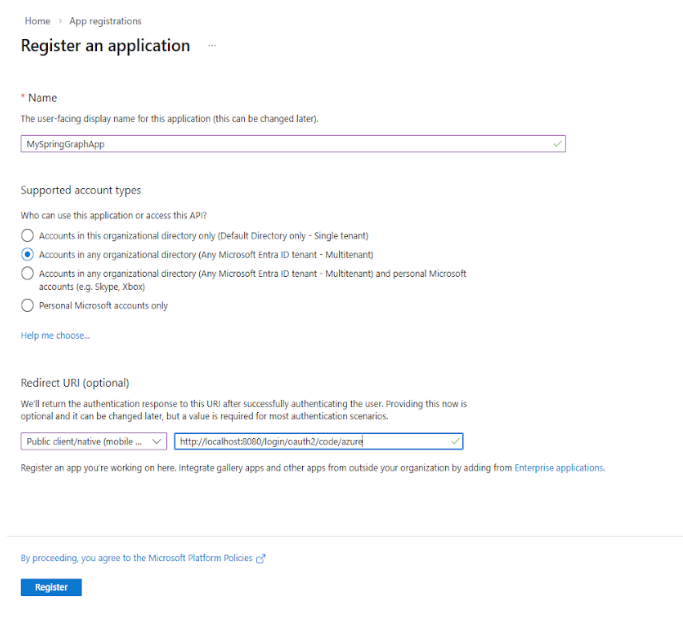
- Name: e.g., MySpringGraphApp.
- Supported account types: Multitenant (“Accounts in any organizational directory”) or Single tenant.
- Redirect URI: Platform Web, URI http://localhost:8080/login/oauth2/code/azure (or your production URL).
- Click Register.
Step 3 – Note Application (client) ID and Directory (tenant) ID
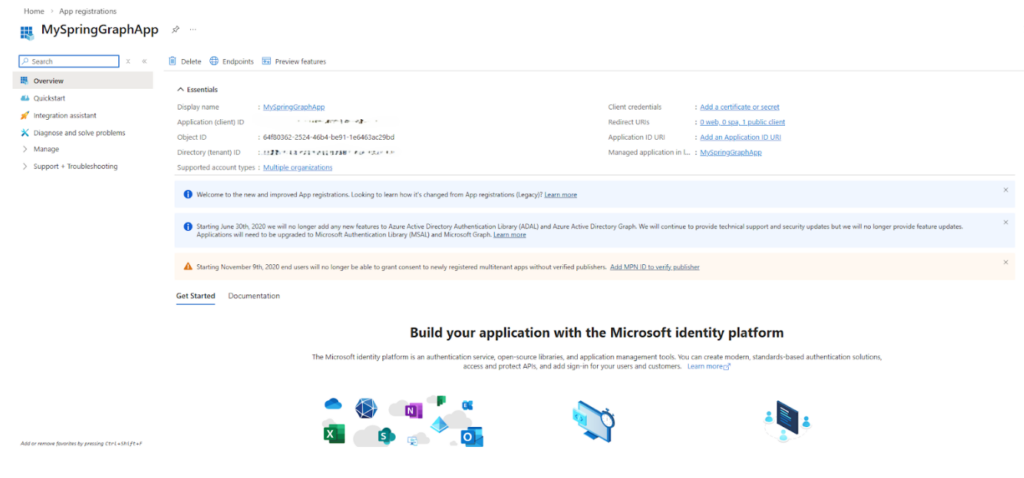
On the app Overview page, copy and save:
- Application (client) ID → use as AZURE_CLIENT_ID
- Directory (tenant) ID → use as AZURE_TENANT_ID
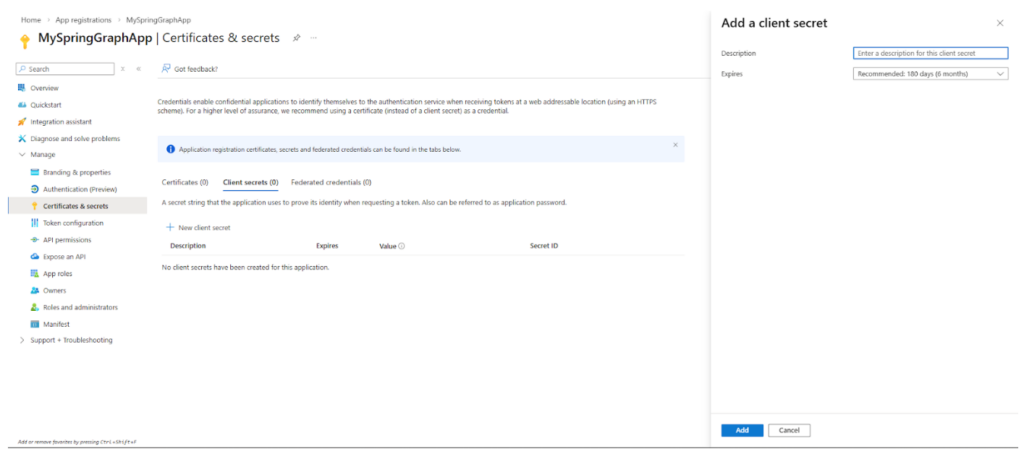
Step 4 – Create a client secret
- Left menu → Certificates & secrets → + New client secret.
- Description and expiry → Add.
- Copy the Value immediately (not Secret ID). Store as AZURE_CLIENT_SECRET.
Step 5 – Add API permissions (all features)
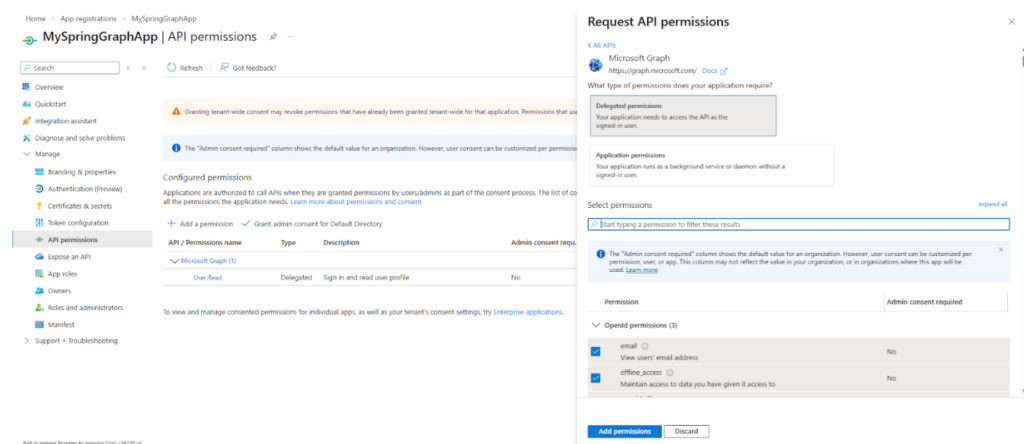
- Left menu → API permissions → + Add a permission.
- Choose Microsoft Graph.
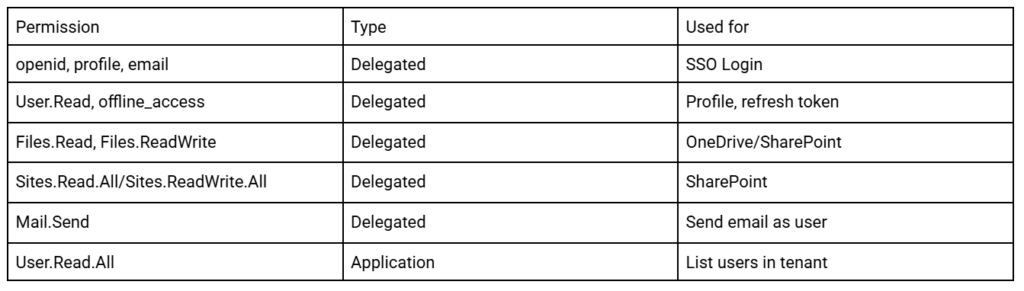
- Delegated: openid, profile, email, User.Read, offline_access, Files.Read, Files.ReadWrite, Sites.Read.All (or Sites.ReadWrite.All), Mail.Send.
- Application: User.Read.All; optionally Files.ReadWrite.All, Sites.ReadWrite.All, Mail.Send.
- Click Grant admin consent for <your org>.
Step 6 – Authentication
Under Authentication, ensure your Web redirect URI is listed. Set Allow public client flows to No for a web app.
Use Client ID, Tenant ID, and Client secret in Spring Boot Java application.yml (Section 8).
Multi-Tenant SSO Authentication
Multi-tenant SSO lets users from different Azure AD tenants sign in to your app. You can use one multi-tenant app or per-tenant registration (registration id = azure-{tenantId}). The flow: user hits login → redirect to Azure AD → sign in → redirect back with auth code → app exchanges code for access + refresh tokens → app stores them and uses OBO to get a Graph token for API calls.
Spring Boot – per-tenant ClientRegistration (one registration per tenant with tenant-specific URIs):
Java – OAuthClientConfig (snippet)
					ClientRegistration registration = ClientRegistration
    .withRegistrationId("azure-" + tenantId)
    .clientId(oauth2Properties.getClientId())
    .clientSecret(oauth2Properties.getClientSecret())
    .scope("openid", "profile", "email", "User.Read", "offline_access",
           "Files.Read", "Files.ReadWrite", "Sites.Read.All", "Mail.Send")
    .authorizationUri("https://login.microsoftonline.com/" + tenantId + "/oauth2/v2.0/authorize")
    .tokenUri("https://login.microsoftonline.com/" + tenantId + "/oauth2/v2.0/token")
    .jwkSetUri("https://login.microsoftonline.com/" + tenantId + "/discovery/v2.0/keys")
    .userInfoUri("https://graph.microsoft.com/v1.0/me")
    .redirectUri("{baseUrl}/login/oauth2/code/{registrationId}")
    .authorizationGrantType(AuthorizationGrantType.AUTHORIZATION_CODE)
    .build();
Fetching User Data from Microsoft
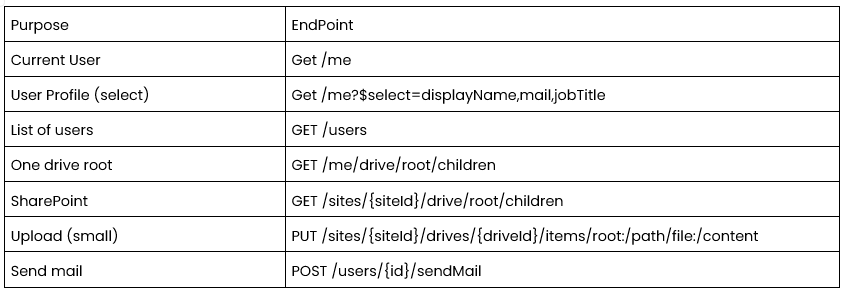
With a valid Graph access token (from OBO or application permission) you can read the signed-in user (GET /me) or directory users (GET /users, requires User.Read.All application permission).
Current user profile: GET https://graph.microsoft.com/v1.0/me with optional ?$select=id,displayName,mail,userPrincipalName,givenName,surname,department,companyName,jobTitle,mobilePhone.
Example – get profile with WebClient (reactive):
Java
					String url = "https://graph.microsoft.com/v1.0/me?$select=id,displayName,mail,...";
getValidGraphToken(userId)
    .flatMap(token -> webClient.get()
        .uri(url)
        .header("Authorization", "Bearer " + token)
        .retrieve()
        .bodyToMono(AzureUserDetail.class));
Access SharePoint and OneDrive
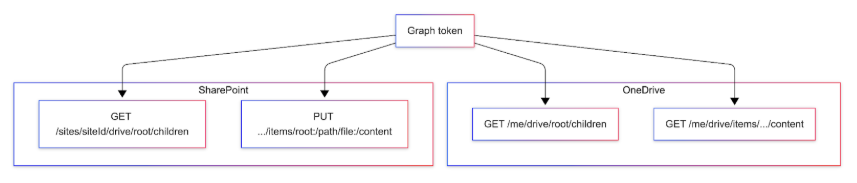
OneDrive: Each user has a personal drive. List root: GET /me/drive/root/children. Download: GET /me/drive/items/{id}/content.
SharePoint: Resolve site with GET /sites/{siteId}/drive (or by host + path). Upload small file: PUT /sites/{siteId}/drives/{driveId}/items/root:/path/to/file:/content. Use site ID and drive ID for reliable targeting.
Integrate Outlook for Sending Emails
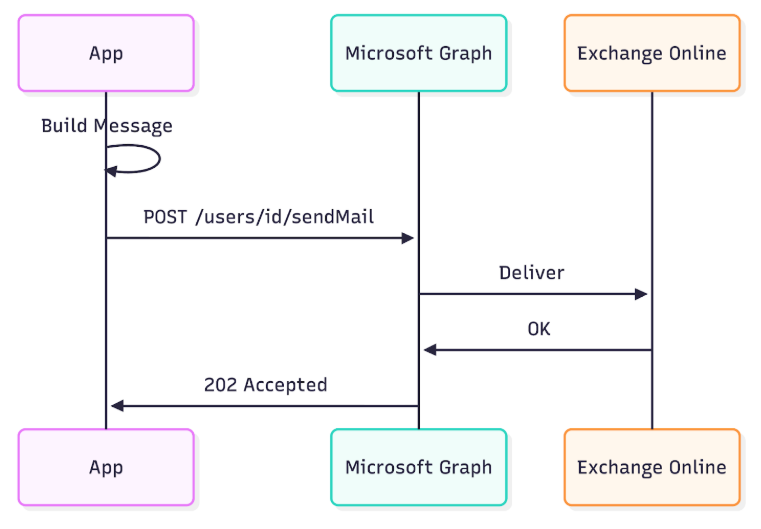
Send emails via Microsoft Graph as the signed-in user (delegated Mail.Send) or as any user (application Mail.Send).
Endpoint: POST https://graph.microsoft.com/v1.0/users/{userIdOrEmail}/sendMail
Request body: message (subject, body with contentType and content, toRecipients) and saveToSentItems: true.
Full Spring Boot Implementation
This section provides complete, copy-paste-ready Spring Boot code. Use the values from Phase 0 (Client ID, Tenant ID, Client Secret) in your application.yml. Package used in examples: com.example.graph (you can change it).
Project setup: pom.xml (dependencies)
Create a Spring Boot 3.x project (Java 17 or 21) and add these dependencies:
XML – pom.xml
					<dependencies>
    <dependency>
        <groupId>org.springframework.boot</groupId>
        <artifactId>spring-boot-starter-webflux</artifactId>
    </dependency>
    <dependency>
        <groupId>org.springframework.boot</groupId>
        <artifactId>spring-boot-starter-security</artifactId>
    </dependency>
    <dependency>
        <groupId>org.springframework.boot</groupId>
        <artifactId>spring-boot-starter-oauth2-client</artifactId>
    </dependency>

    <dependency>
        <groupId>org.springframework.boot</groupId>
        <artifactId>spring-boot-starter-data-jpa</artifactId>
    </dependency>
    <dependency>
        <groupId>org.postgresql</groupId>
        <artifactId>postgresql</artifactId>
        <scope>runtime</scope>
    </dependency>
    <dependency>
        <groupId>com.microsoft.aad.msal4j</groupId>
        <artifactId>msal4j</artifactId>
        <version>1.14.2</version>
    </dependency>
    <dependency>
        <groupId>com.nimbusds</groupId>
        <artifactId>nimbus-jose-jwt</artifactId>
        <version>9.37.3</version>
    </dependency>
    <dependency>
        <groupId>com.fasterxml.jackson.core</groupId>
        <artifactId>jackson-databind</artifactId>
    </dependency>
    <dependency>
        <groupId>org.projectlombok</groupId>
        <artifactId>lombok</artifactId>
        <optional>true</optional>
    </dependency>
</dependencies>
- webflux: reactive REST and WebClient for Graph calls.
- security + oauth2-client: Azure AD login and token handling.
- data-jpa + postgresql: store user Graph tokens.
- msal4j: On-Behalf-Of flow to get Graph tokens.
- nimbus-jose-jwt: parse JWT (e.g. expiry).
Configuration: application.yml
Replace placeholders with values from Phase 0. Use environment variables AZURE_CLIENT_ID, AZURE_CLIENT_SECRET, AZURE_TENANT_ID in production.
YAML – application.yml
					spring:
  application:
    name: graph-integration-app
  datasource:
    url: jdbc:postgresql://localhost:5432/yourdb
    username: youruser
    password: yourpassword
    driver-class-name: org.postgresql.Driver
  jpa:
    hibernate:
      ddl-auto: update
    database-platform: org.hibernate.dialect.PostgreSQLDialect

# Azure AD / Microsoft Graph – from Phase 0
oauth:
  props:
    client-id: ${AZURE_CLIENT_ID:your-client-id}
    client-secret: ${AZURE_CLIENT_SECRET:your-client-secret}
    tenant-id: ${AZURE_TENANT_ID:your-tenant-id}
    redirect-uri: http://localhost:8080/login/oauth2/code/azure
    graph-scope: https://graph.microsoft.com/.default
    user-info-url: https://graph.microsoft.com/v1.0/me
    share-point-url: https://graph.microsoft.com/v1.0/me/drive/root/children
    one-drive-url: https://graph.microsoft.com/v1.0/me/drive/root/children
    authorization-grant-type: authorization_code

organisation:
  allowed:
    tenants:
      - your-tenant-id-1
      - your-tenant-id-2

app:
  encryption:
    key: Your16ByteKey!!
Properties classes
Java – Oauth2Properties.java
					package com.example.graph.config;
import lombok.Data;
import org.springframework.boot.context.properties.ConfigurationProperties;
import org.springframework.stereotype.Component;
@Data
@Component
@ConfigurationProperties(prefix = "oauth.props")
public class Oauth2Properties {
    private String clientId;
    private String clientSecret;
    private String tenantId;
    private String redirectUri;
    private String graphScope;
    private String userInfoUrl;
    private String sharePointUrl;
    private String oneDriveUrl;
    private String authorizationGrantType;
}
Java – OrganisationProperties.java
					package com.example.graph.config;
import lombok.Data;
import org.springframework.boot.context.properties.ConfigurationProperties;
import org.springframework.stereotype.Component;
import java.util.List;

@Data
@Component
@ConfigurationProperties(prefix = "organisation.allowed")
public class OrganisationProperties {
    private List<String> tenants;
}
OAuth2 client registration (multi-tenant per tenant)
Java – OauthClientConfig.java
					package com.example.graph.config;
import org.springframework.context.annotation.Bean;
import org.springframework.context.annotation.Configuration;
import org.springframework.security.oauth2.client.InMemoryOAuth2AuthorizedClientService;
import org.springframework.security.oauth2.client.OAuth2AuthorizedClientService;
import org.springframework.security.oauth2.client.registration.ClientRegistration;
import org.springframework.security.oauth2.client.registration.ClientRegistrationRepository;
import org.springframework.security.oauth2.client.registration.InMemoryClientRegistrationRepository;
import org.springframework.security.oauth2.core.AuthorizationGrantType;
import java.util.ArrayList;
import java.util.List;

@Configuration
public class OAuthClientConfig {

    private final Oauth2Properties oauth2Properties;
    private final OrganisationProperties organisationProperties;

    public OAuthClientConfig(Oauth2Properties oauth2Properties,
     OrganisationProperties organisationProperties) {
        this.oauth2Properties = oauth2Properties;
        this.organisationProperties = organisationProperties;
    }

    @Bean
    public ClientRegistrationRepository clientRegistrationRepository() {
        List<ClientRegistration> registrations = new ArrayList<>();
        for (String tenantId : organisationProperties.getTenants()) {
            ClientRegistration registration = ClientRegistration
                    .withRegistrationId("azure-" + tenantId)
                    .clientId(oauth2Properties.getClientId())
                    .clientSecret(oauth2Properties.getClientSecret())
                    .scope("openid", "profile", "email", "User.Read", "offline_access",
                          "Files.Read", "Files.ReadWrite", "Sites.Read.All", "Mail.Send")
                    .authorizationUri("https://login.microsoftonline.com/" + tenantId + "/oauth2/v2.0/authorize")
                    .tokenUri("https://login.microsoftonline.com/" + tenantId + "/oauth2/v2.0/token")
                    .jwkSetUri("https://login.microsoftonline.com/" + tenantId + "/discovery/v2.0/keys")
                    .userInfoUri(oauth2Properties.getUserInfoUrl())
                    .userNameAttributeName("preferred_username")
                    .redirectUri(oauth2Properties.getRedirectUri())
                    .authorizationGrantType(AuthorizationGrantType.AUTHORIZATION_CODE)
                    .build();
            registrations.add(registration);
        }
        return new InMemoryClientRegistrationRepository(registrations);
    }

    @Bean
    public OAuth2AuthorizedClientService authorizedClientService(
            ClientRegistrationRepository repo) {
        return new InMemoryOAuth2AuthorizedClientService(repo);
    }
}
Entity and repository (token storage)
Java – UserGraphToken.java
					package com.example.graph.entity;
import jakarta.persistence.*;
import lombok.AllArgsConstructor;
import lombok.Data;
import lombok.NoArgsConstructor;
import java.time.LocalDateTime;

@Entity
@Table(name = "user_graph_tokens")
@Data
@NoArgsConstructor
@AllArgsConstructor
public class UserGraphToken {
    @Id
@GeneratedValue(strategy = GenerationType.IDENTITY)
    private Long id;
    @Column(unique = true)
    private String userEmail;
    @Column(columnDefinition = "TEXT")
    private String graphAccessToken;
    @Column(columnDefinition = "TEXT")
    private String azureAccessToken;
   @Column(columnDefinition = "TEXT")
   private String azureRefreshToken;
  @Column(nullable = false)
   private LocalDateTime expiresAt;
}
Java – UserGraphTokenRepository.java
					package com.example.graph.repository;
import com.example.graph.entity.UserGraphToken;
import org.springframework.data.jpa.repository.JpaRepository;
import org.springframework.stereotype.Repository;
import java.util.Optional;

@Repository
public interface UserGraphTokenRepository extends JpaRepository<UserGraphToken, Long> {
    Optional<UserGraphToken> findByUserEmail(String userEmail);
}
Encryption utility (store tokens encrypted)
Add app.encryption.key: Your16ByteKey!! to application.yml (use a 16-byte secret in production).
Java – AESEncryptionUtil.java
					package com.example.graph.util;
import org.springframework.beans.factory.annotation.Value;
import org.springframework.stereotype.Component;
import javax.crypto.Cipher;
import javax.crypto.SecretKey;
import javax.crypto.spec.SecretKeySpec;
import java.nio.charset.StandardCharsets;
import java.util.Base64;
@Component
public class AESEncryptionUtil {
    private final SecretKey secretKey;
    public AESEncryptionUtil(@Value("${app.encryption.key:Your16ByteKey!!}") String key) {
        byte[] keyBytes = key.getBytes(StandardCharsets.UTF_8);
        if (keyBytes.length != 16) {
            throw new IllegalArgumentException("Encryption key must be 16 bytes for AES");
        }
        this.secretKey = new SecretKeySpec(keyBytes, "AES");
    }

    public String encrypt(String value) throws Exception {
        Cipher cipher = Cipher.getInstance("AES");
        cipher.init(Cipher.ENCRYPT_MODE, secretKey);
        byte[] encrypted = cipher.doFinal(value.getBytes(StandardCharsets.UTF_8));
        return Base64.getEncoder().encodeToString(encrypted);
    }

    public String decrypt(String encrypted) throws Exception {
        Cipher cipher = Cipher.getInstance("AES");
        cipher.init(Cipher.DECRYPT_MODE, secretKey);
        byte[] decoded = Base64.getDecoder().decode(encrypted);
        return new String(cipher.doFinal(decoded), StandardCharsets.UTF_8);
    }
}
WebClient for Microsoft Graph
Java WebClientConfig.java
					package com.example.graph.config;
import org.springframework.context.annotation.Bean;
import org.springframework.context.annotation.Configuration;
import org.springframework.http.client.reactive.ReactorClientHttpConnector;
import org.springframework.web.reactive.function.client.ExchangeStrategies;
import org.springframework.web.reactive.function.client.WebClient;
import reactor.netty.http.client.HttpClient;
import java.time.Duration;
@Configuration
public class WebClientConfig {

    @Bean
    public WebClient graphWebClient(WebClient.Builder builder) {
        return builder
                .baseUrl("https://graph.microsoft.com/v1.0")
                .clientConnector(new ReactorClientHttpConnector(
                        HttpClient.create().responseTimeout(Duration.ofSeconds(60))))
                .exchangeStrategies(ExchangeStrategies.builder()
                        .codecs(c -> c.defaultCodecs().maxInMemorySize(16 * 1024 * 1024))
                        .build())
                .build();
    }
}
DTO and Graph service
AzureUserDetail.java – DTO for /me and users list:
Java – AzureUSerDetail.java
					package com.example.graph.dto;
import com.fasterxml.jackson.annotation.JsonAlias;
import lombok.Data;
public class AzureUserDetail {
    @JsonAlias("id")
    private String oid;
    private String displayName;
    private String userPrincipalName;
    private String mail;
    private String givenName;
private String surname;
    private String department;
    private String companyName;
    private String jobTitle;
    private String mobilePhone;
}
GraphService.java – core logic: token resolution, OBO, profile, users, application token:
Java – GraphService.java
					package com.example.graph.service;
import com.example.graph.config.Oauth2Properties;
import com.example.graph.config.OrganisationProperties;
import com.example.graph.dto.AzureUserDetail;
import com.example.graph.entity.UserGraphToken;
import com.example.graph.repository.UserGraphTokenRepository;
import com.example.graph.util.AESEncryptionUtil;
import com.fasterxml.jackson.databind.ObjectMapper;
import com.microsoft.aad.msal4j.*;
import com.nimbusds.jwt.SignedJWT;
import lombok.RequiredArgsConstructor;
import lombok.extern.slf4j.Slf4j;
import org.springframework.core.ParameterizedTypeReference;
import org.springframework.http.MediaType;
import org.springframework.stereotype.Service;
import org.springframework.web.reactive.function.client.WebClient;
import reactor.core.publisher.Mono;
import java.net.URI;
import java.time.Duration;
import java.time.Instant;
import java.time.LocalDateTime;
import java.time.ZoneId;
import java.util.*;

@Service
@RequiredArgsConstructor
@Slf4j
public class GraphService {
private final Oauth2Properties oauth2Properties;
    private final OrganisationProperties organisationProperties;
    private final ObjectMapper objectMapper;
    private final AESEncryptionUtil encryptionUtil;
    private final UserGraphTokenRepository tokenRepository;
    private final WebClient graphWebClient;

    private static final String USER_SELECT = "?$select=id,displayName,mail,userPrincipalName,givenName,surname,department,companyName,mobilePhone,jobTitle";
    public Mono<String> getValidGraphToken(String userEmail) {
        UserGraphToken token = tokenRepository.findByUserEmail(userEmail)
                .orElseThrow(() -> new RuntimeException("No token found for user: " + userEmail));
        try {
            if (token.getGraphAccessToken() != null && token.getExpiresAt().isAfter(LocalDateTime.now())) {
                String graphToken = encryptionUtil.decrypt(token.getGraphAccessToken());
                return Mono.just(graphToken);
            }
            String azureAccess = encryptionUtil.decrypt(token.getAzureAccessToken());
            String azureRefresh = encryptionUtil.decrypt(token.getAzureRefreshToken() != null ? token.getAzureRefreshToken() : "");
            return refreshAzureTokenIfNeeded(token, azureAccess, azureRefresh)
                    .flatMap(newAccess -> refreshGraphTokenOBO(userEmail, newAccess));
        } catch (Exception e) {
            log.error("Token error for {}", userEmail, e);
            return Mono.error(new RuntimeException("Token decryption/refresh failed", e));
        }
    }

    private Mono<String> refreshAzureTokenIfNeeded(UserGraphToken token, String access, String refresh) {
        try {
            SignedJWT jwt = SignedJWT.parse(access);
            if (jwt.getJWTClaimsSet().getExpirationTime().after(new Date())) {
                return Mono.just(access);
            }
            return refreshAzureToken(refresh)

                    .map(newTokens -> {
                        try {
                            token.setAzureAccessToken(encryptionUtil.encrypt(newTokens.get("access_token")));
                            token.setAzureRefreshToken(encryptionUtil.encrypt(newTokens.get("refresh_token")));
                            tokenRepository.save(token);
                            return newTokens.get("access_token");
                        } catch (Exception e) {
                            throw new RuntimeException(e);
                        }
                    });
        } catch (Exception e) {
            return Mono.error(e);
        }
    }

    private Mono<Map<String, String>> refreshAzureToken(String refreshToken) {
        return WebClient.create("https://login.microsoftonline.com/" + oauth2Properties.getTenantId() + "/oauth2/v2.0/token")
                .post()
                .contentType(MediaType.APPLICATION_FORM_URLENCODED)
                .body(org.springframework.web.reactive.function.BodyInserters.fromFormData("client_id", oauth2Properties.getClientId())
                        .with("client_secret", oauth2Properties.getClientSecret())
                        .with("grant_type", "refresh_token")
                        .with("refresh_token", refreshToken)
                        .with("scope", "https://graph.microsoft.com/.default openid profile"))
                .retrieve()
                .bodyToMono(new ParameterizedTypeReference<Map<String, String>>() {});
    }

    private Mono<String> refreshGraphTokenOBO(String userEmail, String azureAccessToken) {
        try {
            ConfidentialClientApplication app = ConfidentialClientApplication.builder(
                            oauth2Properties.getClientId(),
                            ClientCredentialFactory.createFromSecret(oauth2Properties.getClientSecret()))
                    .authority("https://login.microsoftonline.com/" + oauth2Properties.getTenantId())
                    .build();
            OnBehalfOfParameters params = OnBehalfOfParameters.builder(
                            Collections.singleton(oauth2Properties.getGraphScope()),
                            new UserAssertion(azureAccessToken))
                    .build();
            return Mono.fromFuture(app.acquireToken(params))
                    .map(result -> {
                        try {
                            UserGraphToken t = tokenRepository.findByUserEmail(userEmail).orElseThrow();
                            t.setGraphAccessToken(encryptionUtil.encrypt(result.accessToken()));
                            t.setExpiresAt(LocalDateTime.ofInstant(
                                    Instant.ofEpochMilli(result.expiresOnDate().getTime()),
                                    ZoneId.systemDefault()));
                            tokenRepository.save(t);
                            return result.accessToken();
                        } catch (Exception e) {
                            throw new RuntimeException(e);
                        }
                    });
        } catch (Exception e) {
            return Mono.error(e);
        }
    }

    public Mono<AzureUserDetail> getUserProfile(String userEmail) {
        String url = oauth2Properties.getUserInfoUrl() + USER_SELECT;
        return getValidGraphToken(userEmail)
                .flatMap(token -> graphWebClient.get()
                        .uri(url)
                        .header("Authorization", "Bearer " + token)
                        .retrieve()
                        .bodyToMono(String.class))
                .flatMap(json -> Mono.fromCallable(() -> objectMapper.readValue(json, AzureUserDetail.class)));
    }

    public Mono<String> callUserGraphApi(String userEmail, String fullUrl) {
        return getValidGraphToken(userEmail)
                .flatMap(token -> graphWebClient.get()
                        .uri(URI.create(fullUrl))
                        .header("Authorization", "Bearer " + token)
                        .retrieve()
                        .bodyToMono(String.class));
    }

    public Mono<String> getApplicationToken(String tenantId) {
        validateTenant(tenantId);
        try {
            ConfidentialClientApplication app = ConfidentialClientApplication.builder(
                            oauth2Properties.getClientId(),
                            ClientCredentialFactory.createFromSecret(oauth2Properties.getClientSecret()))
                    .authority("https://login.microsoftonline.com/" + tenantId)
                    .build();
            ClientCredentialParameters params = ClientCredentialParameters.builder(
                            Set.of("https://graph.microsoft.com/.default"))
                    .build();
            return Mono.fromFuture(app.acquireToken(params))
                    .timeout(Duration.ofSeconds(30))
                    .map(IAuthenticationResult::accessToken);
        } catch (Exception e) {
            return Mono.error(new RuntimeException("Application token failed", e));
        }
    }

    private void validateTenant(String tenantId) {
        if (!organisationProperties.getTenants().contains(tenantId)) {
            throw new RuntimeException("Tenant not allowed: " + tenantId);
        }
    }

    public Mono<List<AzureUserDetail>> getUsersByDomain(String tenantId, String domain) {
        String url = "https://graph.microsoft.com/v1.0/users" + USER_SELECT + "&$top=999";
        return getApplicationToken(tenantId)
                .flatMap(token -> fetchAllUsersRecursively(url, token, domain, new ArrayList<>()));
    }
    private Mono<List<AzureUserDetail>> fetchAllUsersRecursively(String url, String token, String domain, List<AzureUserDetail> acc) {
        return graphWebClient.get()
                .uri(URI.create(url))
                .header("Authorization", "Bearer " + token)
                .header("ConsistencyLevel", "eventual")
                .retrieve()
                .bodyToMono(new ParameterizedTypeReference<Map<String, Object>>() {})
                .flatMap(res -> {
                    List<Map<String, Object>> value = (List<Map<String, Object>>) res.get("value");
                    if (value != null) {
                        value.stream()
                                .filter(m -> {
                                    String mail = (String) m.get("mail");
                                    String upn = (String) m.get("userPrincipalName");
                                    return (mail != null && mail.toLowerCase().endsWith("@" + domain))
                                            || (upn != null && upn.toLowerCase().endsWith("@" + domain));
                                })
                                .map(m -> objectMapper.convertValue(m, AzureUserDetail.class))
                                .forEach(acc::add);
                    }
                    String next = (String) res.get("@odata.nextLink");
                    if (next != null) return fetchAllUsersRecursively(next, token, domain, acc);
                    return Mono.just(acc);
                });
    }
}
When the user first logs in (e.g. via frontend + Azure MSAL), your backend must receive the Azure access and refresh tokens and persist them; optionally call getValidGraphToken(email) once to populate the Graph token.
Auth – store Azure tokens after login
When the frontend performs Azure AD login and sends the Azure access token (and refresh token) to your backend: validate the token, extract email/tenantId/expiry, encrypt and save to UserGraphToken. Optionally call graphService.getValidGraphToken(email) once to populate the Graph token. Integrate into e.g. POST /api/v1/auth/azure-login with body { “accessToken”: “…” }.
Graph controller
Java – MSGraphController.java
					package com.example.graph.controller;

import com.example.graph.config.Oauth2Properties;
import com.example.graph.dto.AzureUserDetail;
import com.example.graph.service.GraphService;
import lombok.RequiredArgsConstructor;
import org.springframework.web.bind.annotation.*;
import reactor.core.publisher.Mono;
import java.util.List;

@RestController
@RequestMapping("/api/v1/graph")
@RequiredArgsConstructor
public class MSGraphController {

    private final GraphService graphService;
    private final Oauth2Properties oauth2Properties;

    @GetMapping("/profile")
    public Mono<AzureUserDetail> getProfile(@RequestHeader("X-User-Email") String userEmail) {
        return graphService.getUserProfile(userEmail);
    }

    @GetMapping("/org/{tenantId}/users-by-domain")
    public Mono<List<AzureUserDetail>> getUsersByDomain(@PathVariable String tenantId,
                                                              @RequestParam String domain) {
        return graphService.getUsersByDomain(tenantId, domain);
    }

    @GetMapping("/sharepoint")
    public Mono<String> getSharePoint(@RequestHeader("X-User-Email") String userEmail) {
        return graphService.callUserGraphApi(userEmail, oauth2Properties.getSharePointUrl());
    }

    @GetMapping("/onedrive")
    public Mono<String> getOneDrive(@RequestHeader("X-User-Email") String userEmail) {
        return graphService.callUserGraphApi(userEmail, oauth2Properties.getOneDriveUrl());
    }

    @GetMapping("/applicationToken/{tenantId}")
    public Mono<String> getApplicationToken(@PathVariable String tenantId) {
        return graphService.getApplicationToken(tenantId);
    }
}
In production, resolve userEmail from your JWT or session instead of a header.
Email service and send-mail endpoint
Java – EmailService.java
					package com.example.graph.service;

import lombok.RequiredArgsConstructor;
import org.springframework.http.MediaType;
import org.springframework.stereotype.Service;
import org.springframework.web.reactive.function.client.WebClient;
import reactor.core.publisher.Mono;
import java.util.Arrays;
import java.util.List;
import java.util.Map;
import java.util.stream.Collectors;

@Service
@RequiredArgsConstructor
public class EmailService {

    private final GraphService graphService;
    private final WebClient graphWebClient;

    public Mono<Void> sendEmail(String senderEmail, String toRecipients, String subject, String body) {
        return graphService.getValidGraphToken(senderEmail)
                .flatMap(token -> {
                    List<Map<String, Object>> toList = Arrays.stream(toRecipients.split(","))
                            .map(String::trim)
                            .map(addr -> Map.<String, Object>of("emailAddress", Map.of("address", addr)))
                            .collect(Collectors.toList());
                    Map<String, Object> message = Map.of(
                            "subject", subject,
                            "body", Map.of("contentType", "Text", "content", body != null ? body : ""),
                            "toRecipients", toList
                    );
                    Map<String, Object> payload = Map.of(
                            "message", message,
                            "saveToSentItems", true
                    );
                    return graphWebClient.post()
                            .uri("https://graph.microsoft.com/v1.0/users/" + senderEmail + "/sendMail")
                            .header("Authorization", "Bearer " + token)
                            .contentType(MediaType.APPLICATION_JSON)
                            .bodyValue(payload)
                            .retrieve()
                            .toBinder();
                });
    }
}
Add to controller:
Java – MSGraphController.java
					@PostMapping("/send-mail")
public Mono<ResponseEntity<String>> sendMail(
        @RequestHeader("X-User-Email") String senderEmail,
        @RequestParam String to,
        @RequestParam String subject,
        @RequestParam(required = false) String body) {
    return emailService.sendEmail(senderEmail, to, subject, body != null ? body : "")
            .thenReturn(ResponseEntity.ok("Email sent"))
            .onErrorResume(e -> Mono.just(ResponseEntity.status(500).body("Failed: " + e.getMessage())));
}
            return graphService.getUserProfile(userEmail);
    }
Security configuration
Allow unauthenticated access to login and OAuth2 callback; protect /api/v1/graph/** with your JWT or session. Example for WebFlux:
Java – SecurityConfig (WebFlux)
					@Configuration
@EnableWebFluxSecurity
public class SecurityConfig {

    @Bean
    public SecurityWebFilterChain securityWebFilterChain(ServerHttpSecurity http) {
        return http
                .authorizeExchange(ex -> ex
                        .pathMatchers("/login/**", "/oauth2/**", "/actuator/health").permitAll()
                        .pathMatchers("/api/v1/graph/**").authenticated()
                        .anyExchange().authenticated())
                .oauth2Login(Customizer.withDefaults())
                .csrf(ServerHttpSecurity.CsrfSpec::disable)
                .build();
    }
}
End-to-End Flow
Lorem ipsum dolor sit amet, consectetur adipiscing elit. Ut elit tellus, luctus nec ullamcorper mattis, pulvinar dapibus leo.
This guide demonstrated how to build secure, production-ready integrations using Java Spring Boot and Microsoft Graph API, covering multi-tenant authentication, token management, and access to core Microsoft 365 services. The same architectural and security patterns apply broadly across modern technology stacks and cloud platforms.
More hands-on, implementation-focused content is published across topics such as AWS, Azure, identity and security, and scalable backend architectures. Stay connected for additional technical guides and practical engineering insights- Xcelore.com/blog
Read more: “All about Spring Boot 3, it’s Features and Enhancements“