The year 2025 marks a major turning point for artificial intelligence. We’ve moved beyond the phase of simple “Chat with Data” (RAG) and one-off prompts into a new era: Agentic Orchestration. AI is no longer just about generating a single response from a Large Language Model (LLM). Instead, modern systems rely on multi-step workflows that involve reasoning, using tools, managing state, and coordinating multiple specialized AI agents working together.
For engineering leaders and enterprise teams, this shift has created two dominant approaches to building these systems: CrewAI and LangGraph.
CrewAI has become the go-to framework for fast prototyping. It works like a digital version of a human team–where “Researchers,” “Analysts,” and “Managers” each have goals and backstories. This role-playing style makes it incredibly easy to build multi-agent systems quickly. But when these prototypes are pushed into real production environments, they often hit a “complexity wall.” Problems like unpredictable loops, cluttered context windows, and unclear inter-agent communication make scalability and reliability difficult, especially under strict SLAs.
LangGraph, on the other hand, is built for production from day one. Instead of relying on human-like metaphors, it uses a structured, engineering-friendly model based on Graph Theory and State Machines. By defining each step as a node and each path as an edge, LangGraph offers precise control, built-in looping, and checkpointing for reliability. It may take longer to set up initially, but the payoff is a system that is far easier to maintain, debug, and scale in enterprise environments.
This comprehensive article serves as a strategic and technical manual for navigating the transition from CrewAI prototypes to LangGraph production systems, giving a detailed analysis on LangGraph vs CrewAI comparison. It provides:
- Deep Technical Analysis: A granular comparison of the architectural underpinnings of both frameworks.
- Why Prototypes Fail: Explains common reasons why AI prototypes that work in testing break in real-world use, like delays in agent coordination or runaway costs.
- How to Transition: A clear, step-by-step guide to update older CrewAI systems and turn them into reliable LangGraph production setups.
- Making It Work in the Real World: Tips for monitoring performance, controlling costs, and working with Generative AI expertise to successfully deploy your AI systems at scale.
The Agentic Landscape in 2025: From Novelty to Infrastructure
To understand why the choice between LangGraph vs CrewAI matters, one must first appreciate the rapid evolution of the “Agent” as a software primitive.
The Evolution of Cognitive Architectures
In 2023, the industry focused on “Chains”—linear sequences of LLM calls (Input → Prompt → LLM → Output). While deterministic, chains lacked agency; they could not adapt to unexpected inputs or failures.
In 2024, the focus shifted to “Loops” and “Autonomous Agents” (like AutoGPT and BabyAGI). These systems could reason and retry, but they were often chaotic and difficult to control.
In 2025, the standard is Structured Orchestration. We now acknowledge that “autonomy” is not a binary state but a spectrum. Production systems require “Bounded Agency”—agents that are free to reason within a tightly defined problem space but are constrained by rigid architectural guardrails.
This shift has driven the adoption of Multi-Agent Systems (MAS). The consensus is that decomposing a complex problem (e.g., “Conduct a Due Diligence Audit”) into specialized sub-agents (e.g., “Financial Analyst,” “Legal Reviewer,” “Risk Assessor”) yields superior performance compared to a single monolithic model. Specialized agents can utilize smaller, fine-tuned models, specific toolsets, and distinct system prompts to reduce hallucinations and improve focus.
The "Valley of Death" in Agent Development
A critical phenomenon observed in the 2024-2025 cycle is the “Valley of Death” for AI projects. This refers to the high failure rate of agentic applications moving from a local Jupyter Notebook to a Kubernetes production cluster.
- The Prototype: Runs on a developer’s laptop, with everything happening quickly and under direct human supervision. It works like magic in this controlled environment.
- The Production System: Runs in the cloud without constant human oversight. It has to handle network delays, API limits, multiple users at once, and cost constraints.
What Changes in Production: The “magic” often breaks. Delays can make agents stall or give wrong responses, and important instructions can get lost in long conversations between agents. This is why frameworks like CrewAI, which focus on ease of use, can struggle in production, while LangGraph, which focuses on control and reliability, performs better.
Deep Dive into CrewAI — The Master of Rapid Prototyping
CrewAI revolutionized the agentic space by introducing a mental model that anyone could understand: The Digital Workforce.
Architectural Philosophy: Role-Playing as Code
CrewAI’s core architecture is built around the anthropomorphization of software functions. It assumes that LLMs perform best when they “stay in character.”
The Persona Primitive
In CrewAI, an agent is defined by three key strings:
- Role: The job title (e.g., “Senior Market Researcher”).
- Goal: The primary objective (e.g., “Uncover the latest trends in renewable energy”).
- Backstory: A narrative description (e.g., “You are a veteran analyst with 20 years of experience…”).
This approach leverages the LLM’s vast training data on human interactions. By setting the “Backstory,” the developer effectively applies a “System Prompt” that tunes the model’s tone, vocabulary, and bias without needing to manually craft complex prompt engineering instructions.
Structured Collaboration Patterns
CrewAI offers two primary process patterns for agent coordination:
- Sequential Process: A linear relay race. Agent A completes a task and passes the entire output to Agent B. This is deterministic and useful for pipelines like “Scrape URL → Summarize Text → Write Tweet”.
- Hierarchical Process: A “Manager” agent (often powered by a high-reasoning model like GPT-4) is automatically instantiated. This Manager receives the high-level objective, breaks it down into sub-tasks, and delegates them to the “worker” agents based on their role descriptions.
Strengths in the Development Cycle
The primary value proposition of CrewAI is Velocity.
- Low Cognitive Load: The abstraction maps 1:1 with business logic. A non-technical Project Manager can review a CrewAI config file and understand exactly who is responsible for what.
- Rich Tooling Ecosystem: CrewAI provides a suite of pre-built tools (crewai_tools) for common tasks:
- SerperDevTool: Google Search integration.
- FileReadTool: Local file system access.
- WebsiteSearchTool: RAG over specific URLs.
These tools are “plug-and-play,” allowing a functional web-scraping researcher crew to be assembled in under 50 lines of Python.9
The Production Ceiling: Why Prototypes Fail
Despite its ease of use, CrewAI introduces significant risks when deployed in mission-critical environments. These risks stem largely from its reliance on implicit, conversation-based orchestration.
The Latency and Coordination Trap
In a revealing production post-mortem, a team described how a CrewAI system that worked perfectly locally fell apart in production. The cause was traced to network latency. In the local environment, agent-to-agent communication was near-instant. In production, API calls introduced a 200-500ms delay.
This latency disrupted the implicit coordination timing. Agents would “timeout” waiting for a response and proceed to hallucinate an answer or duplicate the work of another agent. Because the orchestration logic is hidden inside the CrewAI framework (the “Black Box”), the developers could not easily adjust the timeout thresholds or coordination logic.
The "Loop of Doom" and Cost Blowouts
A major risk in autonomous systems is the infinite loop. In CrewAI, if an agent fails to use a tool correctly (e.g., a syntax error in a calculator tool), the framework often prompts the agent to “try again.”
Without strict, state-based counters, agents can get stuck in a “Loop of Doom”, repeatedly trying the same failed action.
Real-World Impact: Users have reported costs ballooning to $7 per run for simple tasks because the agents spent thousands of tokens apologizing to each other and retrying failed tool calls without a hard exit condition.
Context Window Pollution
CrewAI manages state primarily through Conversation History. As agents collaborate, the context window fills with their dialogue (“Here is the data,” “Thanks, I will now analyze it”).
- The Problem: In complex, multi-step tasks, the “Signal-to-Noise” ratio degrades. The original instructions (the Goal) get pushed out of the context window by the “chatter.” This leads to Information Degradation, where Agent C receives a watered-down version of the task from Agent B, resulting in lower quality outputs.
Deep Dive into LangGraph – The Production Engine
LangGraph represents a fundamental shift in how we architect AI systems. It moves away from the “Social” metaphor of CrewAI and embraces a Computational metaphor: The State Machine.
Architectural Philosophy: Graph Theory as Infrastructure
LangGraph is built on the mathematical principles of Directed Cyclic Graphs (DCG).
- Nodes: These are the compute units. A node can be an agent, a function, an API call, or a human interaction.
- Edges: These are the control flow paths.
- Standard Edge: Always go from Node A to Node B.
- Conditional Edge: Go from Node A to Node B if Condition X is met; otherwise, go to Node C.
This architecture forces the developer to be a “Cartographer.” You must map out the terrain of the application. The agent (the “Navigator”) has freedom to reason within a node, but it cannot transition to a new state unless a valid path exists on the map.
The "State" as the Single Source of Truth
In contrast to CrewAI’s conversational memory, LangGraph relies on a Shared State Schema.
This is typically a Python TypedDict or Pydantic model that defines exactly what data the application tracks.
					class AgentState(TypedDict):
    objective: str
    research_documents: List[str]
    draft_version: int
    critique_notes: str
    is_approved: bool
Every node receives this State as input and returns a State update as output. This eliminates the “Telephone Game” problem. Agent C does not rely on what Agent B said; it relies on the structured data Agent B wrote to the research_documents key in the State.
Key Production Capabilities
Cyclic Execution (The Reason-Act Loop)
The defining feature of LangGraph is its native support for cycles (loops).
- Use Case: Code Generation.
- Node A (Coder): Writes a Python script.
- Node B (Tester): Runs the script.
- Conditional Edge: If the script fails, route back to Node A with the error log. If it passes, route to Node C (Deploy).
This “Feedback Loop” is the engine of agentic improvement. While possible in CrewAI, it is often fragile and prone to infinite conversational spirals. In LangGraph, it is a first-class structural primitive with explicit recursion limits to prevent cost runaways.
Persistence and Time Travel
LangGraph introduces a Checkpointer mechanism.
- Mechanism: After every node execution, the State is serialized and saved to a database (e.g., Postgres, Redis).
- Benefit 1: Fault Tolerance. If the production pod crashes, the system can “hydrate” the state from the database and resume execution from the exact node where it stopped. This is “Durable Execution.”
- Benefit 2: Human-in-the-Loop (HITL). The graph can pause at an “Approval” node. It can sit dormant for days, consuming zero compute. When a human manager clicks “Approve” in a UI, the API updates the state (is_approved=True) and resumes the graph.
- Benefit 3: Time Travel. For debugging, engineers can load a past checkpoint, modify the state (e.g., correct a hallucinated search query), and “fork” the execution from that point to see if the outcome improves.
Fine-Grained Control
LangGraph allows for Deterministic Routing. You can write Python logic to control the flow.
- Example: if confidence_score < 0.7: return “human_help”.
This guarantees that the agent will never proceed with low confidence, adhering strictly to business rules. In CrewAI, you can only ask the agent to be careful; in LangGraph, you enforce it.
Comparative Analysis: LangGraph vs CrewAI
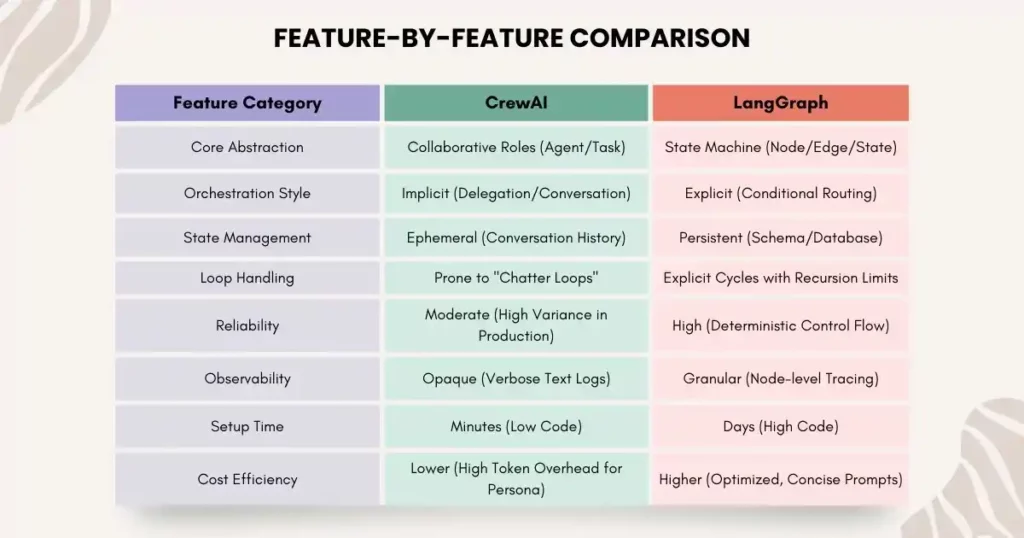
When architecting for 2025, the choice between LangGraph vs CrewAI is a trade-off between Velocity and Control.
The Hybrid Approach: "Crews as Nodes"
An emerging pattern involves nesting CrewAI within LangGraph.
- Architecture: The outer “Skeleton” of the application is a robust LangGraph StateMachine. It handles database connections, API routing, and error handling.
- The “Creative” Node: One specific node in the graph (e.g., “Brainstorm_Node”) instantiates a temporary CrewAI object.
- Why? Brainstorming benefits from the fluid, unstructured “chatter” that CrewAI excels at.
- Mechanism: The LangGraph node spins up the Crew, runs it for a specific task, captures the output, updates the global State, and then shuts down the Crew.
This approach leverages LangGraph for reliability and CrewAI for creativity, offering a “Best of Both Worlds” solution.
Migration Guide: From CrewAI Prototype to LangGraph Production
For teams that have successfully demonstrated value with a CrewAI prototype, the next step is often a refactor to LangGraph to meet production requirements. This section serves as a technical manual for that migration.
Phase 1: The Mental Shift (Deconstruction)
You must stop thinking in terms of “Who” (Agents) and start thinking in terms of “What” (State) and “When” (Flow).
- CrewAI Mental Model: “I have a Researcher and a Writer. The Researcher finds data and hands it to the Writer.”
- LangGraph Mental Model: “I have a State object containing research_data and draft. I have a research_node that populates research_data. I have a write_node that reads research_data and populates draft.”
Phase 2: Defining the Schema (The Contract)
In CrewAI, the data interface is implicit. In LangGraph, it must be explicit.
Step 1: Analyze your CrewAI logs. What data is actually critical?
Step 2: Define the State.
					from typing import TypedDict, List, Annotated
import operator

class ProductionState(TypedDict):
    # The user's original query
    topic: str

    # List of documents found. 'operator.add' means new data is appended, not overwritten.
    research_docs: Annotated[List[str], operator.add]

    # The final output draft
    draft_content: str

    # Meta-data for control flow
    retry_count: int
    error_log: List[str]
Phase 3: Converting Agents to Nodes
A “Role” in CrewAI becomes a “Node” function in LangGraph. The “Backstory” becomes a System Prompt.
Legacy CrewAI Code:
					researcher = Agent(
    role='Researcher',
    goal='Find extensive data on {topic}',
    backstory='You are a senior analyst...',
    tools=
)
Modern LangGraph Code:
					def research_node(state: ProductionState):
    topic = state['topic']

    # Construct the prompt explicitly
    system_prompt = "You are a senior analyst. Find extensive data."
    user_prompt = f"Topic: {topic}"

    # Execute Tool (Pseudo-code)
    search_results = search_tool.run(topic)

    # Return the State Update
    return {"research_docs": [search_results]}
Insight: Note that we stripped away the conversational overhead. The node simply does the work and updates the state.
Phase 4: Explicit Control Flow (The Edges)
Replace CrewAI’s “Manager” delegation with deterministic logic.
Legacy CrewAI Code:
					crew = Crew(
    agents=[researcher, writer],
    process=Process.hierarchical # The "Black Box"
)
Modern LangGraph Code:
					def route_step(state: ProductionState):
    # Deterministic Logic
    if not state['research_docs']:
        if state['retry_count'] < 3:
            return "research_retry"
        else:
            return "human_fallback"
    return "writer"

workflow = StateGraph(ProductionState)
workflow.add_node("researcher", research_node)
workflow.add_node("writer", writer_node)

# Add the Conditional Edge
workflow.add_conditional_edges("researcher", route_step)
This logic guarantees that the Writer never runs without data, a common failure mode in CrewAI.
Phase 5: Persistence and Observability
Compile the graph with a Checkpointer to enable “Durable Execution.”
					from langgraph.checkpoint.memory import MemorySaver

# In production, use PostgresSaver or RedisSaver
checkpointer = MemorySaver()

app = workflow.compile(checkpointer=checkpointer)
Now, every execution is saved. You can query the status of a run, pause it, or resume it – capabilities that are mandatory for enterprise SLAs.
Operational Excellence: Running Agents in the Wild
Deploying the code is only half the battle. “Day 2” operations – monitoring, debugging, and optimizing – are where the long-term success of an agentic system is determined.
The Observability Stack
In 2025, opaque “black box” execution is unacceptable. You need “X-Ray” vision into your agents.
- LangSmith: The gold standard for LangGraph. It visualizes the entire graph execution trace. You can click on any node to see the inputs, outputs, and latency. It allows for “Playground” debugging, where you can modify a failed prompt and re-run just that node to test a fix.16
- Langfuse: An open-source alternative focusing on cost and quality metrics. It tracks “Token Usage per Step” and “Latency Heatmaps,” helping you identify which specific agent is driving up your cloud bill.17
- Arize Phoenix: Specialized in Evaluation. It answers the question: “Is my agent hallucinating?” It uses LLM-as-a-Judge techniques to score agent outputs against a golden dataset, tracking performance drift over time.
Preventing Cost Runaways
The “Infinite Loop” is the most dangerous failure mode in agentic AI.
- Scenario: An agent encounters an API error, apologizes, and retries the same request. It does this 100 times in a minute.
Solution: LangGraph’s recursion_limit acts as a circuit breaker.
					# Hard limit of 20 steps
app.invoke(inputs, config={"recursion_limit": 20})
Coupled with retry_count logic in the State, this ensures that no single execution can burn through your monthly budget.
Latency Management
To combat the 200-500ms latency issues seen in production, LangGraph allows for streaming.
- Instead of waiting for the entire agent response, you can stream the output token-by-token to the frontend. This reduces the perceived latency for the user, improving the UX even if the agent is performing complex “Reasoning” steps in the background.
Final Thoughts: Scaling Your Agentic AI with Confidence
Building an AI prototype is exciting, but turning it into a reliable, production-grade system is where most projects stall. CrewAI sparks creativity and accelerates prototyping, while LangGraph provides the control, durability, and observability necessary for enterprise-scale deployments.
By following a structured approach – defining clear state schemas, converting agents into nodes, and implementing explicit control flows – you can avoid common pitfalls like infinite loops, cost blowouts, and context window pollution.
Xcelore helps you bridge this gap. Their expertise in refactoring CrewAI prototypes into LangGraph systems, fine-tuning custom Generative AI models, and integrating securely with enterprise platforms ensures your AI workflows are robust, efficient, and scalable.
Prototype with Crews, produce with Graphs, and partner with Xcelore to unlock the full potential of agentic and Generative AI Services – delivering real-world business impact with confidence.