In modern cloud-native projects, infrastructure provisioning is no longer a one-time activity. It is continuous, iterative, and deeply tied to application delivery. In this blog, we will explore how Terraform automation can be used to provision and manage cloud infrastructure in a scalable, secure, and repeatable way.
This post will walk through how Terraform can be implemented for infrastructure provisioning, focusing on real-world concepts such as:
- Remote state management using S3 backend
- Terraform workspaces for multi-environment deployments
- State locking mechanisms to prevent conflicts
- Best practices that make Terraform automation production-read
If you are working in Cloud, DevOps, or Platform Engineering, this practical guide will help you understand why Terraform automation is critical and how to implement it effectively.
Why Terraform Automation Is Essential in Cloud Projects
As cloud environments grow, managing infrastructure manually becomes risky and inefficient. Clicking through consoles does not scale, introduces human error, and makes infrastructure changes hard to audit.
Terraform automation solves this by enabling Infrastructure as Code (IaC), where infrastructure is defined, versioned, and managed like application code.
Terraform automation helps achieve:
- Faster and repeatable infrastructure provisioning
- Consistent environments across dev, QA, and production
- Safe collaboration between multiple engineers
- Controlled and auditable infrastructure changes
Overview of My Terraform-Based Infrastructure Setup
In cloud projects, Terraform can be used to provision and manage infrastructure based on these core principles:
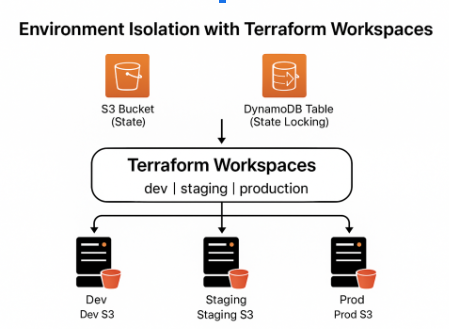
- Remote state stored in Amazon S3
- State locking using DynamoDB
- Multiple environments managed via Terraform workspaces
- Modular, reusable Terraform code
- Automated provisioning aligned with DevOps workflows
Let’s break these concepts down.
Terraform Remote State Backend Using S3
Why Remote State Is Important
Terraform maintains a state file that maps real-world infrastructure to Terraform resources. By default, this state file is stored locally, but in team environments, this approach quickly becomes problematic.
To solve this, a remote state backend using Amazon S3 can be configured.
Benefits of Remote State
- Centralized state management
- Secure storage and encryption
- Team collaboration without conflicts
- Easy integration with CI/CD pipelines
Terraform S3 Backend Configuration (Example)
					terraform {
  backend "s3" {
    bucket         = "my-terraform-state-bucket"
    key            = "infra/terraform.tfstate"
    region         = "us-east-1"
    encrypt        = true
    dynamodb_table = "terraform-state-lock"
  }
}
Explanation
- bucket → S3 bucket to store the Terraform state file
- key → Logical path inside the bucket
- encrypt → Ensures state file encryption
- dynamodb_table → Enables state locking
This setup ensures that the Terraform state is secure, centralized, and production-ready.
State Locking Mechanism with DynamoDB
Why State Locking Matters
In collaborative environments, multiple engineers might run Terraform commands simultaneously. Without state locking, this can lead to state corruption and unpredictable infrastructure changes.
Terraform solves this by supporting state locking with services like Amazon DynamoDB.

DynamoDB Table for Terraform State Locking
					resource "aws_dynamodb_table" "terraform_lock" {
  name         = "terraform-state-lock"
  billing_mode = "PAY_PER_REQUEST"
  hash_key     = "LockID"

  attribute {
    name = "LockID"
    type = "S"
  }
}
How State Locking Works
- When terraform apply runs, Terraform acquires a lock
- Other executions are blocked until the lock is released
- Prevents simultaneous infrastructure modifications
This mechanism is critical for enterprise-grade Terraform automation.
Using Terraform Workspaces for Multi-Environment Deployments
The Challenge of Multiple Environments
Most real-world applications require multiple environments, such as:
- Development
- QA / Staging
- Production
Instead of duplicating Terraform code for each environment, Terraform workspaces can be used to manage all environments from a single codebase.

Creating and Managing Workspaces
terraform workspace new dev
terraform workspace new qa
terraform workspace new prod
terraform workspace select dev
Each workspace maintains its own state file, even when using the same backend.
Using Workspaces Inside Terraform Code
					locals {
  environment = terraform.workspace
}

resource "aws_s3_bucket" "app_bucket" {
  bucket = "my-app-${local.environment}-bucket"
  acl    = "private"

  tags = {
    Environment = local.environment
  }
}
Result
- Same Terraform code
- Different environments
- Clean separation of infrastructure state
This approach significantly reduces duplication and improves maintainability.
Infrastructure Provisioning with Terraform Modules
To keep the project scalable, I structured the Terraform code using modules.
Benefits of Terraform Modules
- Reusable infrastructure components
- Cleaner and more readable code
- Easier onboarding for new engineers
- Standardized infrastructure patterns
Example Terraform Module Structure
					terraform/
├── modules/
│   ├── vpc/
│   ├── ec2/
│   └── rds/
├── main.tf
├── variables.tf
├── outputs.tf
Calling a Module
					module "vpc" {
  source     = "./modules/vpc"
  cidr_block = "10.0.0.0/16"
}
Modules help scale infrastructure while maintaining consistency and efficiency.
Terraform Automation and DevOps Workflows
Terraform automation is highly effective when integrated into CI/CD pipelines. In this case:
- Terraform code is stored in Git repositories
- Changes are reviewed via pull requests
- Terraform plan is executed automatically
- Terraform apply requires approvals for production
This ensures:
- Full auditability
- Safer infrastructure changes
- Faster deployments
Security Best Practices in Terraform Automation
Some of the key security practices to follow include:
- Remote state encryption in S3
- IAM roles with least privilege
- No hardcoded secrets in Terraform code
- Secure backend access via IAM policies
Security must always be baked into the Terraform automation process from day one.
Key Takeaways from This Terraform Project
Terraform automation offers significant value when implemented correctly:
- Remote state backends enable safe collaboration
- State locking prevents destructive conflicts
- Workspaces simplify multi-environment deployments
- Modules improve scalability and reuse
- Automation brings speed, reliability, and confidence
Terraform is not just a tool, it becomes the foundation of modern cloud infrastructure.
Final Thoughts
Infrastructure should be predictable, versioned, and automated. Terraform helps move from manual provisioning to a fully automated, production-grade cloud setup.
For organizations looking to scale cloud infrastructure, Terraform automation is not optional, it’s essential.
If your organization is looking to modernize cloud infrastructure, implement Terraform automation, or adopt DevOps best practices, this is where Xcelore can help.
At Xcelore, we specialize in:
- Cloud architecture & migration
- Terraform & Infrastructure as Code (IaC)
- DevOps & CI/CD automation
- Secure, scalable cloud solutions
Let’s build cloud infrastructure that scales with your business. Reach out to explore Xcelore’s Cloud & DevOps services and take your automation journey to the next level.