
Introduction
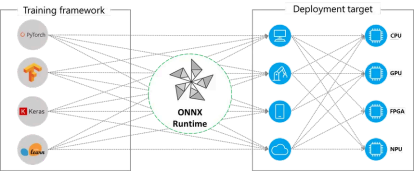
Developing and training the model is one thing, its execution along with optimization is another. ONNX Runtime helps in the latter. It is a cross-platform and cross-language model accelerator that is used for running, optimizing and providing testing and verification interfaces for Machine Learning and Deep Learning models from PyTorch, TensorFlow/Keras, TFLite, scikit-learn, and many others. Besides, it can be of valuable help while working with generative AI by providing high performance, scalability, and flexibility when deploying generative AI models like Generative Adversarial Networks (GANs), Variational Autoencoders (VAEs), and diffusion models. Specific examples of such commonly used models include BERT, RoBERTa, XLNet, and OpenAI’s GPT-2 and DALL-E. With support for diverse frameworks and hardware acceleration, it ensures efficient, cost-effective model inference across platforms.
Why It Matters
There are various fields in AI where ONNX Runtime can be efficiently used for optimal and desirable results. For instance, in generative AI, we can integrate LLMs in our apps and services with the help of it. No matter what language you develop in or what platform you need to run on, you can make use of state-of-the-art models for various purposes like image synthesis and text generation.
CPU, GPU, NPU – no matter what hardware you run on, ONNX Runtime optimizes for latency, throughput, memory utilization, and binary size. In addition to excellent out-of-the-box performance for common usage patterns, additional model optimization techniques and runtime configurations are available to further improve performance for specific use cases and models. This serves as a testament to its efficient performance.
Architecture
The structure and design of ONNX Runtime is built such that it helps us achieve certain key objectives such as maximum and automatic leverage of custom accelerators and runtimes, providing support for high-level optimizations that can be expressed as model-to-model transformations, and the right abstraction and runtime support for custom accelerators and runtimes. We call this abstraction an execution provider.
The key functional aspects of ONNX include:
Improving the inference performance for a wide variety of ML models.
- Running on different hardware and operating systems
- Training in Python but deploying into a C#/C++/Java app
- Training and performing inference with models created in different frameworks
The procedure for the same is as follows:
- Get the model: It can be trained from any framework that supports export/conversion to ONNX format.
- Load and run the model with ONNX Runtime
					import onnxruntime as ort
import numpy as np
# Load the ONNX model
session = ort.InferenceSession("model.onnx")
# Prepare the input (should have model's expected input shape and dtype)
input_name = session.get_inputs()[0].name
input_data = np.random.randn(1, 3, 224, 224).astype(np.float32) # example
# Run inference
outputs = session.run(None, {input_name: input_data})
# Print the output
print(outputs[0])
3. (Optional) Tune performance using various runtime configurations or hardware accelerators.
					import onnxruntime as ort
import numpy as np
# Enable optimization and set execution provider to CUDA (GPU), if availa
providers = ['CUDAExecutionProvider', 'CPUExecutionProvider']
session_options = ort.SessionOptions()
session_options.graph_optimization_level = ort.GraphOptimizationLevel.ORT
# Create the inference session
session = ort.InferenceSession("model.onnx", sess_options=session_options
# Prepare the input
input_name = session.get_inputs()[0].name
input_data = np.random.randn(1, 3, 224, 224).astype(np.float32)
# Run inference
outputs = session.run(None, {input_name: input_data})
# Print the output
print(outputs[0])
Even if we don’t perform the last step, ONNX Runtime will often provide performance
improvements compared to the original framework.
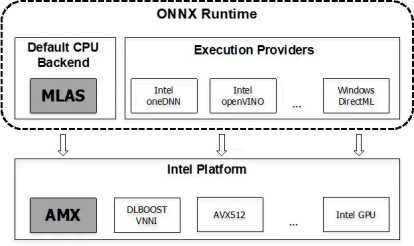
ONNX Runtime applies a number of graph optimizations on the model graph then
partitions it into subgraphs based on available hardware-specific accelerators.
Optimized computation kernels in core ONNX Runtime provide performance
improvements and assigned subgraphs benefit from further acceleration from each
Execution Provider.
Training with ONNX runtime
ONNX Runtime Training’s ORTModule offers a high performance training engine for
models defined using the PyTorch frontend. ORTModule is designed to accelerate
the training of large models without needing to change the model definition and with
just a single line of code change (the ORTModule wrap) to the entire training script.
Using the ORTModule class wrapper, ONNX Runtime runs the forward and backward
pass of the training script using an optimized automatically-exported ONNX
computation graph.
An example for the same is as follows:
pip install torch-ort
First we perform the installation as done above, which is then followed by
configuration:
python -m torch_ort.configure
This is how we approach while dealing with model with Pytorch.
(Note: Make sure to add a ‘!’ before pip while running in Jupyter or Colab)
We then proceed to add ORTModule in the file we perform the training (suppose
train.py)
					from torch_ort import ORTModule
# Define your PyTorch model as usual
model = build_model()
# Wrap the model with ORTModule to enable ONNX Runtime acceleration
model = ORTModule(model)
Hands on ONNX Runtime
To begin with, we need to first install ONNX Runtime in our system. For doing so, use
the following command in the Command Prompt (Windows) or the terminal
(Mac/Linux):
pip install onnx onnxruntime
As mentioned before, we should keep in mind to add a ‘!’ before pip while running in
Jupyter or Colab.
!pip install onnx onnxruntime
Here, onnx is installed to provide tools for reading, writing, editing and validating
the model and onnxruntime is installed to provide the engine for running inference
on it.
Having the pre-requisites set up for our operations, now we will discuss how to
export PyTorch models into ONNX format and then inference with it. The code for
creating the model is available here.
Computer Vision (CV) Models
1. Export the model using torch.onnx.export
					torch.onnx.export(model, # model being run
 torch.randn(1, 28, 28).to(device), # model input (or
 "fashion_mnist_model.onnx", # where to save t
 input_names = ['input'], # the model's inp
 output_names = ['output']
2. Load the onnx model with onnx.load
					import onnx
onnx_model = onnx.load("fashion_mnist_model.onnx")
onnx.checker.check_model(onnx_model)
3. Create inference session using ort.InferenceSession
					import onnxruntime as ort
import numpy as np
x, y = test_data[0][0], test_data[0][1]
ort_sess = ort.InferenceSession('fashion_mnist_model.onnx')
outputs = ort_sess.run(None, {'input': x.numpy()})
# Print Result
predicted, actual = classes[outputs[0][0].argmax(0)], classes[y]
print(f'Predicted: "{predicted}", Actual: "{actual}"')
Natural Language Processing (NLP) Models
1. Process text and create the sample data input and offsets for export.
					import torch
text = "Text from the news article"
text = torch.tensor(text_pipeline(text))
offsets = torch.tensor([0])
2. Export the model using torch.onnx.export like we did before
					# Export the model
torch.onnx.export(model, # model being run
 (text, offsets), # model input (or a tuple for
 "ag_news_model.onnx", # where to save the model (ca
 export_params=True, # store the trained parameter
 opset_version=10, # the ONNX version to export
 do_constant_folding=True, # whether to execute constant
 input_names = ['input', 'offsets'], # the model's inpu
 output_names = ['output'], # the model's output names
 dynamic_axes={'input' : {0 : 'batch_size'}, # variabl
 'output' : {0 : 'batch_size'}}
3. Load the model like before, except that we are using an NLP model this time so
we need to replace the Fasion MNIST model with the AG news model.
So we use:
					import onnx
onnx_model = onnx.load("ag_news_model.onnx")
onnx.checker.check_model(onnx_model)
4. Create inference session using ort.InferenceSession
					import onnxruntime as ort
import numpy as np
ort_sess = ort.InferenceSession('ag_news_model.onnx')
outputs = ort_sess.run(None, {'input': text.numpy(),
 'offsets': torch.tensor([0]).numpy()})
# Print Result
result = outputs[0].argmax(axis=1)+1
print("This is a %s news" %ag_news_label[result[0]])
Summary
As we have seen, ONNX Runtime isnʼt just another ML tool. Its a lightweight,
framework-agnostic engine that brings speed and portability to the models you
already train using PyTorch, TensorFlow, and others. Whether youʼre working on a
classic image classifier or trying to deploy NLP models like AG News or BERT, ONNX
Runtime helps streamline the inference process across CPUs, GPUs, and even edge
devices.
Its compatibility with all major OSs, support from cloud providers like AWS and GCP,
and endorsements from industry giants like Intel, NVIDIA, Adobe, and Hugging Face,
make it a solid choice for deploying models in production. Add to that the fact that it
handles everything from basic CPU inference to quantization, optimization, and even
training acceleration (when paired with ORTModule for PyTorch), and there youʼve
got a powerful backend for yourself.
If your aim is to reduce friction between training and deployment, keep the costs low,
and make your models truly platform-independent, ONNX Runtime might prove to be
exactly what your ML stack needs.
How Xcelore Can Help You
Building complex generative models? As a Generative AI Development Company, Xcelore integrates ONNX Runtime into your ML stack to enhance scalability, portability, and speed without compromising on accuracy.