We're heading to Expand North Star, Dubai (12th-15th October 2025). Stop by our Booth - H10 C-104 to explore our cutting edge AI Solutions. Meet Us We're heading to Expand North Star, Dubai (12th-15th October 2025). Stop by our Booth - H10 C-104 to explore our cutting edge AI Solutions. Meet Us
Real-Time Voice-to-Voice AI Explained: Architecture, Models & Implementation Guide (2026)
12 January 2026
Sameer Malik
Table of Contents
In the rapidly evolving landscape of Generative AI chatbots have become the new standard for user interaction. From customer support to personal assistants, text-based Large Language Models (LLMs) are everywhere. But text has its limits. It requires visual attention, typing dexterity, and literary interpretation. The next frontier, and the true hallmark of a frictionless, immersive user experience, is Voice to Voice AI interaction.
This approach goes beyond the traditional “Speech to Text → Process → Text to Speech” loop commonly used by smart speakers, which often feels slow and robotic. Instead, it focuses on building a real-time, interruptible, conversational agent that listens, thinks, and responds with the natural cadence of human conversation.
This technical guide explores how such a system can be architected end-to-end: from a React-based frontend leveraging AudioWorklets for high-performance audio capture, to a NestJS backend orchestrating real-time streams, and integrations with advanced speech services such as Google Cloud and Microsoft Azure.
The Core Engineering Challenge: Latency & Flow
The primary metric for success in a voice interface is Latency. In a text chat, a 3-4 second delay is acceptable. In a voice conversation, a 3-4 second delay feels like a lifetime. If the user asks a question and is met with dead air, the illusion of intelligence breaks instantly. To achieve a “magical” experience, we had to move away from the traditional Request/Response model (HTTP) and embrace a fully Streaming Architecture.
The Streaming Data Pipeline
Instead of discrete requests, the system operates as a continuous flow:
Input Stream: User microphone → Frontend → WebSocket → Backend
The full round trip must be completed in approximately 2 seconds and remain fully interruptible. If a user speaks while the AI is responding, the system must stop playback instantly and resume listening. This full-duplex capability differentiates a true conversational AI agent from basic voice bots.
Frontend Architecture: Capturing Reality
The frontend acts as the sensory layer of the system. It must capture high-fidelity audio without blocking the UI thread and play streaming audio smoothly.
Moving Beyond ScriptProcessorNode
Historically, ScriptProcessorNode has been used to process audio. However, this runs on the main JavaScript thread. If the React application re-renders a heavy component, the audio glitches.
This can be solved by using the Web Audio API’s AudioWorklet, which runs in a separate thread, ensuring that audio processing is decoupled from UI frame rates.
Implementation:
e.g. VoiceToVoice.tsx
Streaming Audio via WebSockets
The AudioWorklet captures raw PCM data (Float32). To minimize bandwidth, it can be converted to Int16 (16-bit integers) and sent over Socket.IO. Socket.IO is used for its built-in reconnection logic and event-based architecture.
The Playback Queue System
Receiving audio is more complex than sending it. The backend sends audio in small chunks as they are generated. Playing them immediately risks jitter due to network variability.
A playback buffer queue is implemented to ensure smooth output:
Queue: Incoming chunks are pushed to audioQueueRef.
Processor: A recursive function, playNextAudioChunk, pulls the first item, decodes it, and plays it.
Seamlessness: The next chunk is pre-loaded while the current one is playing.
Backend Architecture: The Orchestrator (NestJS)
The backend is where the complexity of state management lives. Since HTTP is stateless, standard REST controllers can’t be used, but a stateful WebSocket gateway can be used.
Session State Management
Each user session transitions through distinct states:
Listening (idle)
Speaking (STT active)
Processing (AI thinking)
Speaking back (TTS active)
Map structure ‘VoiceToVoiceStatesManager’ can be utilized to hold this ephemeral state for every socket.ID
Provider Abstraction via Factory Pattern
The system supports multiple STT providers (Google Cloud Speech and Azure Cognitive Services). A Factory Pattern abstracts provider-specific logic, allowing the core gateway to interact through a common interface without conditional branching.
The Interface (STTProvider):
The Factory (providerFactory.ts):
This ensures the business logic in chat.gateway.ts never knows which provider is being used. It simply calls sttProvider.writeAudio(), and the implementation handles the REST (Google Speech-to-Text uses gRPC streaming with Protobuf-encoded messages, Microsoft Azure Speech to Text streams audio over WebSockets using push-based audio input APIs).
Speech to Text (STT): Real-Time Recognition
Accurate transcription during live speech is foundational to voice interaction.
The Theory: Streaming Recognition
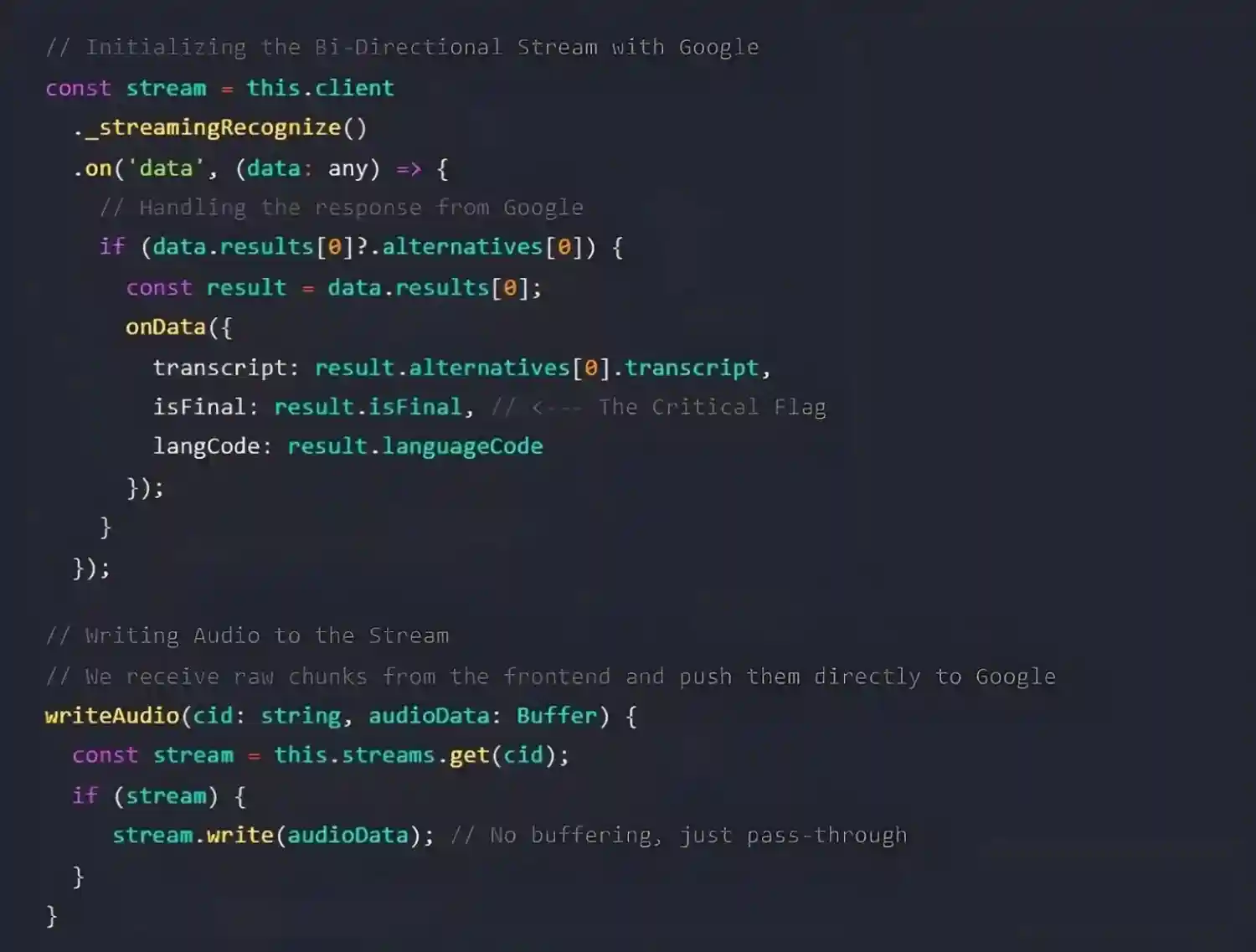
Rather than uploading completed audio files, the system uses bi-directional streaming recognition. Audio chunks are continuously sent to the Speech to Text provider, which asynchronously returns transcription events.
Key Definition: Interim vs. Final Results
Interim results: Partial, evolving transcriptions while the user is speaking
Final results: Committed transcriptions triggered by pauses or silence
Final results initiate the AI response pipeline.
The Code: Handling Binary Streams
STT complexity is encapsulated within provider implementations. For Google Cloud Speech-to-Text, utilize Node.js Streams.
e.g., src/modules/chatSocket/SttProvider.ts.
For Azure, the implementation differs slightly as it uses a PushAudioInputStream, but the theory is identical: write binary, listen for events.
This abstraction allows the main business logic to simply call sttProvider.writeAudio() without worrying about the underlying protocol (gRPC vs WebSocket vs SDK).
The Intelligence Layer: AI Integration
Once a final transcript is available, it is forwarded to a dedicated AI microservice that is connected to via a secondary internal WebSocket.
Why a Secondary Socket?
A dedicated socket is used for the AI service (process.env.AI_CHAT_BASE_URL) because LLM generation is also a streaming process. This allows tokens to be received one by one.
The Code: Orchestrating the AI Handshake
In chat.gateway.ts, this connection is managed. When the user finishes a sentence, the socket is effectively “handed off” to the AI service.
e.g. src/modules/chatSocket/chat.gateway.ts
This code snippet demonstrates the “Token-to-Audio” pipeline. By listening to the aiSocket events and triggering processQueue immediately, what is known as Low Time-To-First-Byte (TTFB) for audio can be achieved. The user hears the AI start speaking “H-” almost exactly when the AI ‘thinks’ of the letter “H”.
The "Interruption" Logic: Making it Feel Human
The hardest problem in Voice to Voice AI usage is the “Barge-In” capability. Scenario:
AI: “The weather in New York is currently 72 degrees with a chance of…”
User: “Wait, I actually meant New York, Texas.”
AI: (Must stop talking immediately and process the correction)
If implemented sequentially, the AI would finish its sentence about New York City before processing the correction. That is bad UX.
Interim Results as Triggers
The “interim results” feature from the Speech to Text providers can be used. This sends transcript events while the user is still speaking, before the sentence is finished.
Backend Logic:
Receive audio chunk from user
Send to STT
STT returns an event: transcript: “Wait, I…” (isFinal: false)
The backend recognizes this as valid speech input
It emits a transcript event to the frontend with an interrupt: true flag
Frontend Response:
This effectively “cuts off” the AI, just like interrupting a human.
Streaming Text to Speech (TTS)
When AI generates a response, it does not generate the whole paragraph at once. It streams tokens (words or parts of words). Waiting for the full sentence before generating audio would introduce latency.
A pipeline was created that aggregates tokens into meaningful “chunks” (usually by punctuation like commas or periods) and sends them to the Text to Speech engine in parallel.
By chunking at punctuation marks (., ?, !), the audio sounds natural (the AI pauses where a human would pause), and generation latency is masked.
Architecture Flowchart
To visualize this complex bi-directional flow, here is the complete system diagram.
Handling Edge Cases & Clean Up
Real-world networks are messy. Users close tabs, Wi-Fi drops, and microphones get muted. Robust resource management is critical to prevent memory leaks in the backend (zombie streams).
The Cleanup Routine
React’s useEffect cleanup function and Socket.IO’s disconnect event are used to ensure aggressive teardown of resources.
Backend Cleanup (chat.gateway.ts)
This prevents the server from paying for STT usage when no one is listening.
Conclusion
Building a Voice to Voice AI feature is not just about connecting a few APIs. It is an orchestration challenge. It requires a deep understanding of asynchronous programming, binary data manipulation, and user experience design.
By transitioning to a WebSockets + AudioWorklet + StreamingArchitecture, the perceived latency was reduced from ~3.5 seconds to under 2.5 seconds, resulting in a conversation that feels alive, responsive, and truly intelligent. This is the difference between a “Voice Command” system and a “Voice Conversation” partner.
Build Real-Time Voice Experiences with Xcelore
If you’re exploring voice-first interfaces or real-time conversational AI agents or systems, Xcelore helps you design, engineer, and scale production-grade Voice to Voice AI systems. Discuss with our team how to transform complex architectures into reliable, human-like interactions.
What if your most advanced AI system becomes your biggest security risk? In 2026, enterprises are not just competing on innovation, but they are battling new-age threats targeting AI infrastructure.
The year 2025 marks a major turning point for artificial intelligence. We’ve moved beyond the phase of simple “Chat with Data” (RAG) and one-off prompts into a new era: Agentic
In retail, customer experience is everything. From personalized recommendations to instant customer support, shoppers want a seamless shopping journey. To deliver an optimal customer experience, businesses are turning to AI.
Exei is an AI-led customer service and engagement automation platform. Its intelligent AI Agents can be trained on multiple data sources, communicate in multiple languages, and work across voice and chat channels.
Xcelight is an AI-powered CCTV video analytics platform that transforms passive surveillance into actionable business intelligence. It empowers organizations to make smarter, data-driven decisions.
Contact Information
sales@xcelore.com
India (HQ) Office No. 14 & 15, 6th Floor, Tower A, Stellar IT Park, C-25, Sector 62, NOIDA, Uttar Pradesh – 201309, India T: +91 81784 97981
US XCELORE INC,8 The Green # 5936 Dover, DE 19901, United States of America T: +12194911103
Exei is an AI-led customer service and engagement automation platform. Its intelligent AI Agents can be trained on multiple data sources, communicate in multiple languages, and work across voice and chat channels.
Xcelight is an AI-powered CCTV video analytics platform that transforms passive surveillance into actionable business intelligence. It empowers organizations to make smarter, data-driven decisions.