Amazon Simple Queue Service (SQS) is a fully managed message queuing service that allows for the decoupling of distributed software systems and components. It enables the reliable, scalable, and secure delivery of messages between various parts of an application and allows the application components to interact asynchronously without tightly coupling the components.
In today’s microservices architecture and cloud-native applications, robust inter-service communication has become critically important. Amazon SQS is the backbone service for building resilient, scalable applications that can adapt to varying loads while maintaining high availability characteristics.
In this blog, we will explore the Amazon Simple Queue Service (SQS) and its main concepts, comparing traditional synchronous communication with asynchronous messaging patterns, understanding the implementation through real-world code examples, and understanding its place in today’s modern distributed systems.
What is Amazon SQS?
Amazon Simple Queue Service (SQS) is a messaging queue service that is distributed and provided by Amazon Web Services (AWS). Its purpose is to act as a buffer between various components of your distributed application, thereby enabling communication through messages instead of API calls.
SQS can be thought of as a post office system for your applications. When one service needs to send information to another, it does not need to send that information directly. The sending service will put the message into a queue (like a mailbox), and the receiving service will pull it from the queue when it is ready to process that information.
Evolution of Message Queuing
Message queuing isn’t a new concept. It originated in the early days of distributed computing when systems needed reliable ways to communicate across networks. The evolution can be traced through several phases:
Early Computing (1960s-1980s): Simple point-to-point communication→ Distributed Systems Era (1990s): Introduction of Message-Oriented→ Middleware (MOM) Internet Age (2000s): Enterprise Service Bus (ESB)→ JMS (Java Message Service) Cloud Era (2010s-Present): Managed cloud services like Amazon SQS, providing scalability and reliability without infrastructure management.
For more detailed information on queues and other message brokers, read our blog: https://xcelore.com/blog/what-is-rabbitmq-and-why-its-simpler-to-use/
Need for SQS in Modern Applications
Modern applications face several challenges that SQS elegantly addresses:
Scalability Challenges
Applications need to handle varying loads without breaking down. Direct service-to-service calls can create bottlenecks and cascade failures.
Reliability Requirements
Systems must continue functioning even when individual components fail. SQS provides message durability and retry mechanisms.
Decoupling Necessity
Tight coupling between services makes applications fragile and hard to maintain. SQS enables loose coupling through asynchronous messaging.
Processing Flexibility
Different services may process data at different speeds. SQS allows each service to consume messages at its own pace.
Communication Patterns: Before and After SQS
Traditional Synchronous Communication (Before SQS)
In traditional architectures, services communicate directly through HTTP calls or RPC.
Characteristics:
- Tight Coupling: Services need to be aware of one another’s endpoints.
- Synchronous Processing: The service being called waits for a response.
- Failure Propagation: A failure in one service affects the entire chain.
- Limited Scalability: Directly calling a service could overwhelm the downstream service.
Example Scenario: When a user creates a site in our application, multiple operations need to happen:
- Save the site to the database
- Create SQS topic
- Initialize AI rules
- Send notifications
Without SQS, all these operations would happen synchronously, making the user wait and increasing the risk of failures.
Asynchronous Messaging Pattern (With SQS)
With SQS, services communicate through message queues:
Characteristics:
- Loose Coupling: Services only need to know about queue names
- Asynchronous Processing: Services can process messages independently
- Fault Tolerance: Messages are persisted and can be retried
- Scalability: Multiple consumers can process messages in parallel
Understanding SQS Through Real-World Implementation
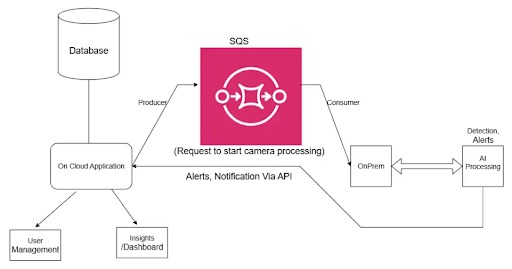
Let’s examine how we implemented SQS in our security monitoring application, which processes AI rules across cloud and local environments.
Producer Side (Cloud Application)
Our cloud application acts as a message producer, sending rule management requests to SQS:
					@Configuration
public class SQSConfiguration {
    @Bean
    @Primary
    public AmazonSQSAsync amazonSQSAsync() {
        return AmazonSQSAsyncClientBuilder.standard()
                .withRegion(System.getProperty("aws.region", "us-east-2"))
                .build();
    }

    @Bean
    public QueueMessagingTemplate queueMessagingTemplate(AmazonSQSAsync amazonSQSAsync) {
        return new QueueMessagingTemplate(amazonSQSAsync);
    }
}
Message Publishing Logic:
					public boolean sendRequestAndAwaitResponse(
        String MessagePayloadType,
        String requestId,
        Map<String, Object> payload,
        long timeout,
        TimeUnit unit,
        String topic
) {
    CompletableFuture<Boolean> future = ResponseHandlerService.registerRequest(requestId);
    try {
        sqsService.publishMessage(MessagePayloadType, topic, payload);
        log.info("Published {} to SQS with requestId: {}", MessagePayloadType, requestId);
        return future.get(timeout, unit);
    } catch (TimeoutException e) {
        log.warn("Timeout waiting for {} response for requestId: {}", MessagePayloadType, requestId);
        return false;
    } catch (Exception e) {
        log.error("Error while awaiting response for requestId: {}", requestId, e);
        throw new RuntimeException(e);
    }
}
Consumer Side (Local Application)
					Our local application acts as a message consumer, processing different types of rule management requests:

@Service
public class SQSConsumerService {

    @PostConstruct
    public void startListenersFromFile() {
        // Initialize listeners for multiple queues from configuration
        File file = new File(filePath);
        if (file.exists() && file.length() > 0) {
            try (BufferedReader reader = new BufferedReader(new FileReader(file))) {
                String line;
                Set<String> processedQueues = new HashSet<>();

                while ((line = reader.readLine()) != null) {
                    String[] parts = line.split(":");
                    if (parts.length == 3) {
                        String siteKey = parts[0].trim();
                        String queueName = parts[1].trim();

                        if (!processedQueues.contains(queueName)) {
                            startListener(queueName, siteKey, false);
                            processedQueues.add(queueName);
                        }
                    }
                }
            }
        }
    }

    public void processMessage(@Payload String message) {
        try {
            SQSMessage sqsMessage = objectMapper.readValue(message, SQSMessage.class);

            String payload = sqsMessage.getPayload();
            String type = sqsMessage.getType();

            switch (type) {
                case "AUTHORIZED_INDIVIDUALS":
                    processRecognisedDetails(payload, type);
                    break;
                case "AREA_OCCUPANCY_START":
                    processAreaOccupStartRule(payload, type);
                    break;
                case "STOP_RULE":
                    processRuleStopDetails(payload, type);
                    break;
                // ... other message types
                default:
                    log.warn("Unknown message type: {}", type);
            }
        } catch (Exception e) {
            log.error("Error processing message: {}", e.getMessage());
        }
    }
}
Real-World Message Flow Example
Here’s how our system handles an “Unauthorized Access” rule creation:
Cloud Application (Producer):
- User creates a rule through the web interface
- System validates the rule and creates the necessary data
- Publishes a message to SQS with a payload containing rule details
SQS Queue:
- Stores the message reliably
- Ensures delivery to consumers
- Handles retries if processing fails
Local Application (Consumer):
- Listens to the queue continuously
- Processes the “AUTHORIZED_INDIVIDUALS” message
- Calls the AI service to start rule processing
- Sends response back through another queue
Message Structure
Our messages follow a consistent structure:
					{
  "type": "AUTHORIZED_INDIVIDUALS",
  "timestamp": "2025-09-17T10:30:00Z",
  "payload": {
    "organizationId": "org-123",
    "ruleId": "rule-456",
    "authorizedPersons": ["person1", "person2"],
    "rtspUrls": ["rtsp://camera1", "rtsp://camera2"],
    "requestId": "req-789",
    "isInclusion": true,
    // ... other rule-specific data
  }
}
Benefits of Amazon SQS
1. Improved Reliability and Fault Tolerance
SQS provides message durability and automatic retries. If a consumer fails to process a message, it remains in the queue and can be processed by another consumer or retried later.
2. Enhanced Scalability
Multiple consumers can process messages in parallel. As the load increases, you can add more consumers without changing the producer code.
3. Loose Coupling
Producers and consumers don’t need to know about each other. They only need to know the queue name, making the system more maintainable and flexible.
4. Load Leveling
SQS acts as a buffer during traffic spikes. Producers can send messages quickly, while consumers process them at a steady rate.
5. Cost Effectiveness
You pay only for what you use. No need to provision infrastructure or manage message brokers.
6. Built-in Security
Integration with AWS IAM, encryption in transit and at rest, and VPC endpoints provide comprehensive security.
7. Dead Letter Queue Support
Messages that fail processing multiple times can be moved to a dead letter queue for analysis and manual intervention.
8. Message Ordering and Deduplication
FIFO queues provide exactly-once processing and maintain message order when required.
Where SQS Excels
- Microservices Communication: Perfect for decoupling microservices and enabling independent scaling and deployment.
- Event-Driven Architectures: Ideal for building reactive systems that respond to events asynchronously.
- Batch Processing: Excellent for queuing work items that need to be processed in batches.
- Integration Patterns: Great for integrating different systems that operate at different speeds or have different availability windows.
- Workflow Orchestration: Useful for coordinating multi-step processes where each step can be handled by different services.
Implement Best Practices
Based on our project experience:
1. Message Design
- Include all necessary context in the message
- Use consistent message structures
- Add correlation IDs for tracking
2. Error Handling
- Implement proper retry logic
- Use dead letter queues for failed messages
- Add message age checks to avoid processing stale messages
3. Monitoring and Logging
- Log message processing for debugging
- Monitor queue depth and processing times
- Set up alerts for queue buildup
4. Security
- Use IAM roles for service-to-service authentication
- Encrypt sensitive data in messages
- Implement proper access controls
Conclusion
The journey from synchronous, tightly-coupled systems to asynchronous, loosely-coupled architectures represents a fundamental shift in how we approach system design. SQS makes this transition not just possible but practical and cost-effective.
Key takeaways from our implementation:
- Decoupling: Services can evolve independently
- Reliability: Messages are durably stored and delivered
- Scalability: Easy to scale consumers based on load
- Flexibility: Different message types can be handled appropriately
As we continue building complex distributed systems, message queuing with SQS provides the foundation for creating resilient, scalable applications that can handle the demands of modern software development.
At Xcelore,An AI Development Company we help businesses unlock the full potential of AWS services. As an AWS Partner, we specialize in building resilient, scalable, and secure distributed systems powered by solutions like Amazon SQS. If you’re looking to modernize your architecture or streamline your cloud journey, connect with us today.
FAQs
-
1. What is Amazon SQS used for?
Amazon SQS is used to decouple application components and enable asynchronous communication. It ensures reliable message delivery, smooth load handling, and fault tolerance in microservices and event-driven systems.
-
2. What is the difference between SNS and SQS?
The basic difference between SQS and SNS is that while SQS stores messages in a queue until consumers pull in and receive the message, SNS pushes messages instantly to multiple subscribers (like email, SMS, Lambda). It is ideal for task distribution, while SNS is the best fit for broadcasting events.
-
3. Is AWS SQS like Kafka?
AWS SQS is a managed queue for simple, reliable message delivery without infrastructure overhead; however, Kafka is a distributed streaming platform that is built for high-throughput, real-time data processing and analytics.